Forum Discussion

DavidR_DYMO
Jan 07, 2022Copper Contributor
Windows 11 Printer Issue - DYMO LW450 DUO is not installing correctly/entirely
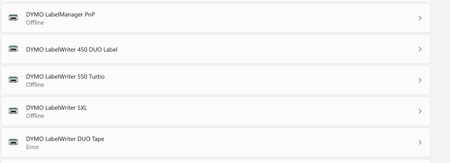
This issue occurs in Windows 11 The expected result is that both DYMO LW450 DUO Label and LW450 DUO Tape install correctly, however only the LW450 DUO Label installs while the LW450 DUO Tape's sta...

KevinW
Jul 21, 2022Brass Contributor
Agreed, sadly 😞
I have just received Build 25163.rs_prerelease.220715-1711 but there is unfortunately no sign of any positive change. I do have both Tape and Label printers showing up in Dymo Label v.8.7.4.48936 but while the paper label works OK, the Tape just comes up with an 'out of paper' error. It seems the virtual port remains confused.
I have also raised the issue yet again with MS and been promised a callback / email update within 48 hrs (now maybe tomorrow sometime). I have tried to emphasise the desperate need for senior management escalation and an active collaboration between MS and Dymo to devise and issue a permanent resolution fix. Also that it would really help for both / and to provide some sort of meaningful communication via this Forum to users who simply want to know what's happening and when. The most basic tenets of customer care seem to be completely foreign concepts.....
Best regards,
Kevin
I have just received Build 25163.rs_prerelease.220715-1711 but there is unfortunately no sign of any positive change. I do have both Tape and Label printers showing up in Dymo Label v.8.7.4.48936 but while the paper label works OK, the Tape just comes up with an 'out of paper' error. It seems the virtual port remains confused.
I have also raised the issue yet again with MS and been promised a callback / email update within 48 hrs (now maybe tomorrow sometime). I have tried to emphasise the desperate need for senior management escalation and an active collaboration between MS and Dymo to devise and issue a permanent resolution fix. Also that it would really help for both / and to provide some sort of meaningful communication via this Forum to users who simply want to know what's happening and when. The most basic tenets of customer care seem to be completely foreign concepts.....
Best regards,
Kevin

megatech1966
Jul 24, 2022Copper Contributor
I reinstalled Windows 10 Pro with a old DVD. Did all the updates and the LW450 Duo works. Did a reboot. Still works. 🤷:male_sign:
Tried Windows 11 again. Not working😩
Tried Windows 11 again. Not working😩
 Raj_K195Jul 28, 2022Copper ContributorI am on Windows 11, seems whatever it is started from late last year's Windows 10 build and carried onto Windows 11.
- Raj_K195Jul 28, 2022Copper Contributor
StevieC-D_UK You can always revert the registry back.. use this as a workaround for now, as Microsoft is obviously not doing anything about it and some of us need to use our label printers.
- Horrgakx1235Jul 27, 2022Copper ContributorIsn't 21H2 for Windows 10? Only this thread is "Windows *11* Printer Issue - DYMO LW450 DUO is not installing correctly/entirely"
 StevieC-D_UKJul 27, 2022Copper Contributor
"but now the devices will be vulnerable to two vulnerabilities, https://www.bleepingcomputer.com/news/microsoft/microsoft-fixes-remaining-windows-printnightmare-vulnerabilities/ and https://www.bleepingcomputer.com/news/microsoft/microsoft-windows-mshtml-bug-now-exploited-by-ransomware-gangs/, actively exploited by threat actors."
Er I don't think I'll be installing that fix, thank you very much.
I can't believe MS are making printer users go down this obviously dangerous route.
- Raj_K195Jul 27, 2022Copper ContributorI have been having a same issue with LabelWriter 450, tried fixing this for hours. It seems that it's caused by the famous or should I say "infamous" print nightmare fix that was released sometime last year. I tried the registry fix from the below link and printer started working (note that I had to remove from printers then connect USB only then it installed properly). As stated in the link, this will remove the "fix" and leave your device vulnerable but this is the only thing that worked for me so I could print labels. Hopefully Microsoft will figure what is causing this and release a more permanent fix. Hopefully this works for some of you!
https://www.bleepingcomputer.com/news/microsoft/how-to-fix-the-windows-0x0000011b-network-printing-error/ - megatech1966Jul 26, 2022Copper ContributorThe next day another update came through and caused the driver not to work properly. It was the November 2021 21H2 I think. I uninstalled it and it worked properly again.