Forum Discussion

DavidR_DYMO
Jan 07, 2022Copper Contributor
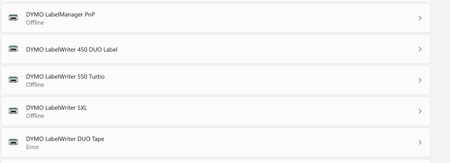
Windows 11 Printer Issue - DYMO LW450 DUO is not installing correctly/entirely
This issue occurs in Windows 11 The expected result is that both DYMO LW450 DUO Label and LW450 DUO Tape install correctly, however only the LW450 DUO Label installs while the LW450 DUO Tape's sta...

IngoM56
Jan 21, 2022Copper Contributor
I installed Windows 11 in mid-October 2021 and immediately got the problem with the Duo450.
At the end of November 2021, I opened my first ticket with DYMO Germany. No solution.
So far, the compatibility chart on DYMO.COM shows that the printer is compatible with Windows 11, but it isn't. I cannot see any information about the Windows 11 issue on DYMO.COM.
The printer is still being sold and Windows 11 has been out for almost four months. Windows 11 customers should be informed before purchasing that the printer will not work at this time.

KevinW
Jan 21, 2022Brass Contributor
I think it is not quite as simple.... I was able to print tapes and labels on the same machine about 10 days ago without issue. Since that I have encountered the problem as described....
- IngoM56Jan 21, 2022Copper Contributor
Did you update Windows 10 to Windows 11 on the same machine and then install the updates?
I did a clean install of Windows 11.- astevebennettJan 22, 2022Brass ContributorTried on a fully patched Windows 11 machine. Didn’t work so fully reset to Windows 11. Same symptoms. Hope that helps.
- KevinWJan 22, 2022Brass ContributorI had 1 PC which was W10 and in-place upgraded to W11 and a second which is a new Dell XPS15 supplied with W11 pre-installed. Both DID work with the printer, but now neither do.
- IngoM56Jan 22, 2022Copper ContributorAs a workaround I installed VirtualBox on my Windows 11 machine, created a Windows 10 Virtual machine and installed the printer software.
Both, Label and Tape, are working.