Forum Discussion

Windows 11 Partitions
 Jun 19, 2026
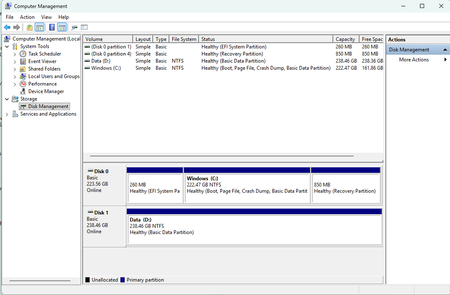
After trying valiantly for many hours I was unable to get a copy of winre.wim for Windows 11, version 24H2 which was deleted when I resized my Recovery partition, I finally solved the problem by reinstalling Windows.
Thanks for replying to my post. I tried to follow your instructions but could not get it to work. I managed to download the ISO file after some difficulty. It is now residing in my Downloads directory. The file name is Win11_25H2_English_x64_v2.iso. Is that the correct file? I double clicked the file and after several tries it did mount and appear in File Explorer. I found install.wim and downloaded 7-Zip. I right-clicked the file and chose 7-Zip. It had two Open Archive options. The first one did nothing. The second one had a bunch of options which I did not know how to choose. I chose one and a file opened up which contained a list of ten files. I was never able to access the Windows\System32\Recovery folder in the ISO file. Now when I double click the Win11_25H2_English_x64_v2.iso file in my Downloads folder it takes a long time, but finally wants to know if I want to open it. It no longer mounts and appears in File Explorer.
- rptrJun 19, 2026Tin Contributor
After trying valiantly for many hours I was unable to get a copy of winre.wim for Windows 11, version 24H2 which was deleted when I resized my Recovery partition, I finally solved the problem by reinstalling Windows.