Forum Discussion

Windows 11 Partitions
 Jun 19, 2026
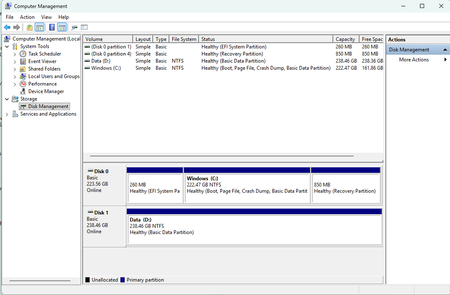
After trying valiantly for many hours I was unable to get a copy of winre.wim for Windows 11, version 24H2 which was deleted when I resized my Recovery partition, I finally solved the problem by reinstalling Windows.

IF you deleted your original recovery partition earlier, you accidentally deleted the actual recovery file (which is called winre.wim). Making a new empty partition doesn't fix the error because the file itself is gone, and Windows can't enable something that doesn't exist. We just need to put a fresh copy of that file back.
Let's see if a backup is hiding on your PC.
- Go to C:\Windows\System32\Recovery.
- You'll need to enable hidden files to see anything. Click View > Show > Hidden items (you might also need to go into Options and uncheck "Hide protected operating system files").
- If you see the winre.wim file in there, awesome! If the folder is empty, no biggie, just move to Step 2
Step 2: Grab a fresh copy from Microsoft : Since the file is gone, we'll extract a new one from a Windows installer.
- Download the Windows 11 ISO from Microsoft's website.
- Double-click the downloaded ISO to "mount" it (it’ll show up on your PC like a DVD drive).
- Open it up, go to the sources folder, and look for a file called install.wim or install.esd.
- You'll need a free app like 7-Zip to open it. Just right-click the install file, choose to open it as an archive with 7-Zip, and dig down into the Windows\System32\Recovery folder.
- Drag the winre.wim file out onto your Desktop, and then copy it into your C:\Windows\System32\Recovery folder.
Step 3: Tell Windows where the file is
- Almost done! Open Command Prompt as an Administrator and type in these commands one by one, hitting Enter after each:
- Tell Windows where we put the file: reagentc /setreimage /path C:\Windows\System32\Recovery
- Turn the recovery environment on (this automatically moves the file into your new 1 GB partition): reagentc /enable
- Double-check our work: reagentc /info
It should now say "Windows RE status: Enabled"!