Forum Discussion

Windows 11 Official broke Surface Pro 7 pen inking

Also it may be a good idea to head over to https://support.microsoft.com/en-us/surface/download-drivers-and-firmware-for-surface-09bb2e09-2a4b-cb69-0951-078a7739e120 and download the latest firmware for your surface. I had a similar issue with the touchscreen keyboard popping up. The surface app and surface extension manager are in the store should do the trick but the firmware is also a Good idea

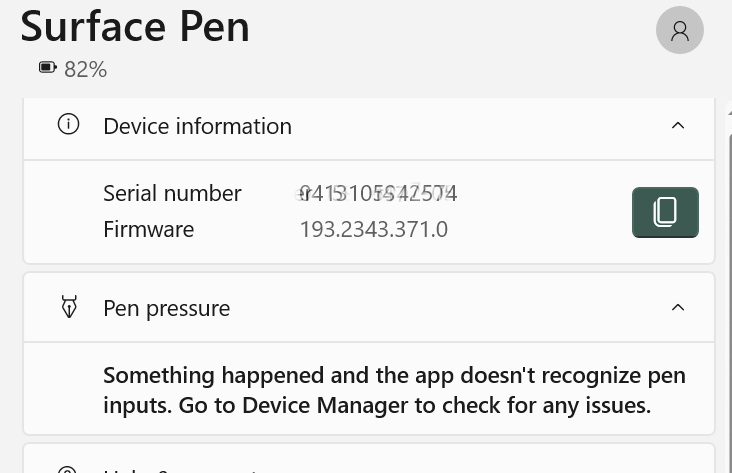
_RBL_ The attachment was snipped from the Surface app. The Surface Management Extension has been in my Library but does nothing when I click Open. It is not in the Store now and no icon in my Library.
From what I have determined, the 3 previous and the current 10/19/21 Surface Pro 7 updates which I still have on the machine failed to update the firmware on the Pen. The firmware on ME, PD, SAM, Touch, and UEFI are current, but not the Pen.
Keep in mind, until now, everything worked, so I never checked Device Manager. Now there are discrepancies.
System SurfacePen217FwUpdate.inf 1.7.139.0 What I have. 08/02/2019
Extension SurfacePen0953CfuOverBleLcExtnPackage.inf 2.9.139.0 will not update 07/20/2020
Extension SurfacePen0953FirmwareUpdate.inf 2.12.139.0 will not update 07/20/2020
Extension SurfaceTouchPenProcessorUpdate.inf 3.329.137.0 will not update says "No Drivers Needed" 10.0.22000.1 02/17/2021
Firmware SurfacePenCfuOverBleLc.inf 1.18.139.0 =OK 08/02/2019
HIDClass SurfacePen217Integration.inf 1.5.139.0 =OK 08/02/2019
HIDClass SurfacePenBleLcAddrAdaptationDriver.inf 2.17.139.0 =OK 08/02/2019
Even with a Feb. 2020 and three 2021 updates applied, the latest Pen stuff is 2019.
MS has made it so easy that it's HARD.
- _RBL_Oct 22, 2021Brass ContributorAh it definitely seems you may have some outdated version of the Store. Have you tried WIN+R type wsreset. Make sure you're logged into the insiders tab and the Store. Or you could install via terminal.
Widget install --name "surface diagnostic toolkit"- jacktechOct 23, 2021Copper Contributorwsreset did nothing for the store. I already have Surface Diagnostic Toolkit for Business installed. In original post, I noted it tests more than consumer version, yet neither tests the Pen.
I did a chat with MS. He gave up quickly when he knew I had already done more than anybody else would have done. And finally he said Recovery - Reset your PC. We stopped at this point.
Right. Easy way out for him. Like I want to reinstall all my apps, reconfigure everything, etc. My 2 year Costco warranty runs out in 2 months. To even start a warranty case, they wanted the machine reset and reinstalled.
If viewing Surface Management Extension in the Store, loads but then the buttons on the Store disappear. If click Open from Library, it does nothing. I updated the Store via Updates. They are set to autoupdate, but I had to manually kick it.
I am stuck. I can't update stuff in Device Manager e.g. Surface Touch Pen Processor because it "doesn't contain a compatible software driver for your device" Catch 22 - driver is for new firmware that is already supposed to be present on the device, but I can't get the firmware updated to accept the driver update.- _RBL_Oct 23, 2021Brass ContributorAnd you've downloaded and installed the surface firmware?