Forum Discussion

Win11 Chrome shows 25 open tabs but I only have 3
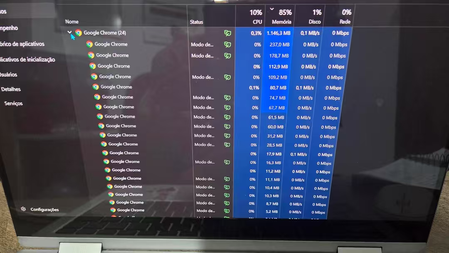

If you mean Windows 11 Task Manager shows “Google Chrome (25)” even though you only have 3 tabs open, that’s normal. The 25 is the number of Chrome processes, not the number of open tabs.
Chrome runs separate processes for things such as each tab/site, extensions, the GPU, network services, audio/video components, background apps, and site isolation. So 3 visible tabs can easily create 15–30 processes.
To see what is actually running, open Chrome and press Shift + Esc. Chrome’s own Task Manager will show which tabs, extensions, and background services are using those processes.
If Chrome is using too much RAM, you can also check chrome://extensions/ and disable extensions you don’t need, then go to Chrome Settings → Performance and enable Memory Saver.