Forum Discussion

Win11 24H2 / Problems with virtual drives
I have installed UltraISO, 32-bit,
under Win11 24H2, 64-bit.
When I include an ISO and start an executable file (e.g. *.exe) with a double click,
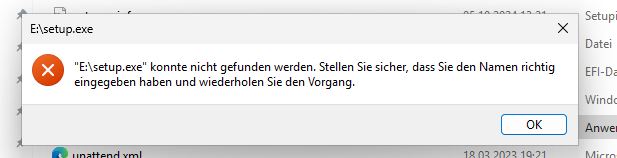
an error message appears: “...exe could not be found...”
UltraISO or PowerISO is not started in this case.
Instead, I click with the right mouse button on the virtual drive
that was created during the installation of UltraISO (e.g. E:\),
then on further options, UltraISO, Load, and then load the ISO,
and then double-click on e.g. “setup.exe” (run as administrator).
The error message shown in the picture will then appear.
However, all files themselves can be changed, copied from the virtual drive,
or accessed, e.g. documents, etc., from the virtual drive.
The same also applies to PowerISO.
If I integrate the ISO via “Deploy” with Win11, it works,
i.e. you can start executable files without any problems.
If I use UltraISo or PowerISO in Win11 23... in this respect, everything still works,
But no longer with Win11 24H2, although it doesn't matter,
whether inplace, new installation, Insider Dev version, etc.
Are there any changes in this regard in Win11 24H2 !?
Or is it a bug !?
10 Replies
 tom2025Copper Contributor
Just a quick note:
with the new version, PowerISO 9.1,
the problem has been solved in the meantime,
that means, deploy a *.iso, via right mouse button in Windows now works again... Jairo_ManuelPCopper Contributor
That's exactly what happened to me when updating to Windows 11 24h2, there is a problem with UltraISO and PowerISO that does not allow applications mounted from an ISO to run in the program's virtual drive... we are waiting for a solution from Microsoft!!!!
- tom2025Copper Contributor
I have now received a message from "PowerISO" support,
That they were able to re-enable the problem and try to make the error in the next update.
In the current SCSI version, the error has already been fixed.- Jairo_ManuelPCopper Contributor
In conclusion, only PowerISO will update your software to work with Windows 11 24h2 and UltraIso will do nothing... meaning we should bury Ultraiso because it is obsolete 😞
 NincklzzCopper ContributorWhere did you download the ISO file?
- tom2025Copper Contributorwhat do you mean by... where was it downloaded?
the problem occurs with every *.iso,
no matter where it is downloaded or created...
- yarux1Copper Contributor
After the update, my system behaves the same. I have no idea if this is a bug or an additional security measure.
- tom2025Copper Contributor
I have found a workaround,
Start UltraISO as admin, load iso,
then you can start executable files in UltraISO.Start executable files,
but it does not work via Windows Explorerand virtuell Drives,
probably a driver problem or
Incompatibility driver virtual drive
in conjunction with Win11 24H2.
With the current version of e.g.
Daemon Tools Lite it works as it should