Forum Discussion

Why I can't enable the 49221331 ID for some reason
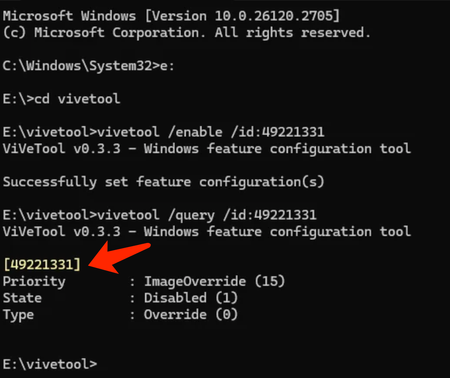

Hello,
I can give some suggestions at this point.
Ensure You're Using the Latest ViVeTool Version:
Make sure you are using the latest version of ViVeTool compatible with your build.
Run the Commands in Elevated Command Prompt:
Verify that you opened the Command Prompt as Administrator before running the commands. If not:
- Search for cmd in the Start Menu.
- Right-click and choose Run as Administrator.
Enable the Feature Again:
Re-run the enable command, but include the restart flag to ensure the changes take effect: vivetool /enable /id:49221331 /restart
Verify Build Compatibility:
Confirm that the 49221331 feature is available for your specific build (26120.2705). Some features might not be fully implemented or enabled for your Dev Channel version yet.
Manually Check the Registry Key (Optional):
If the issue persists, check the Windows Registry to see if the feature flag is applied:
- Open the Registry Editor (regedit).
- Navigate to: HKEY_LOCAL_MACHINE\SYSTEM\CurrentControlSet\Control\FeatureManagement\Overrides
- Search for an entry related to 49221331 and ensure its EnabledState is set to 2.
Clear Cache and Re-Enable (Force Refresh):
- Sometimes, cached configurations can interfere. Try clearing and reapplying the changes:
- vivetool /reset /id:49221331
- vivetool /enable /id:49221331 /restart
Restart Your PC:
- Restart the system to apply changes properly.
If the answer is helpful, please click "Accept Answer" and kindly upvote it. If you have extra questions about this answer, please click "Comment".
Best Regards,