Forum Discussion

Why do some app icons have black squares on them?
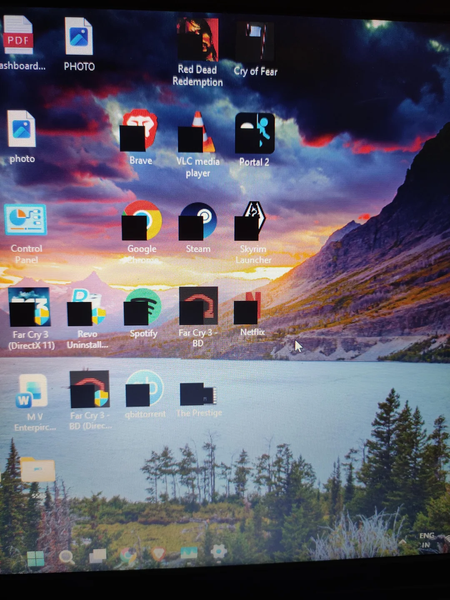

The black squares in your photo sit where the shortcut arrows normally appear. That points more toward a broken shortcut overlay or its icon cache than a graphics hardware problem—especially since ordinary files and folders look unaffected.
Start with Ctrl+Shift+Esc > Task Manager > Windows Explorer > Restart. The desktop and taskbar will briefly disappear and return.
If that doesn’t help, open Command Prompt and run:
ie4uinit.exe -show
That asks Windows to refresh its icons.
If the squares remain, check whether a customisation tool was ever used to hide shortcut arrows, even before this started. Restore its default shortcut-arrow setting and sign out and back in. A missing or invalid replacement arrow icon can produce exactly this kind of black square. There’s no reason to reset Windows based on this symptom alone.