Forum Discussion

Why did my PC suddenly show a black screen error on boot?
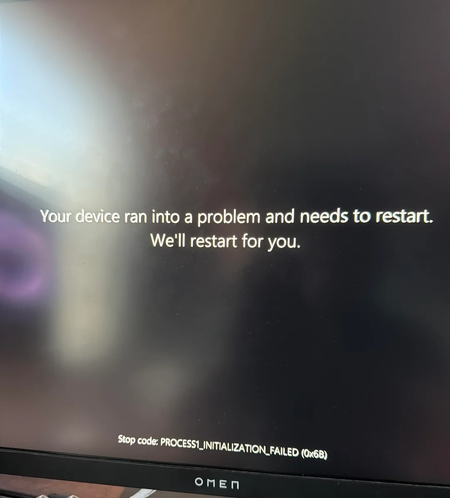

Your screenshot shows PROCESS1_INITIALIZATION_FAILED (0x6B). Windows failed during an early startup stage. That can involve damaged system files or storage problems; it doesn’t specifically identify bad RAM or a failing power supply.
The light matters only if we know what it was. A drive-activity light normally flickers; an RGB light may have an unrelated lighting fault. A motherboard diagnostic LED labelled CPU, DRAM, VGA or BOOT is more useful—check its label and your motherboard manual.
Unless there’s a burning smell, crackling or repeated power loss, let Windows complete the restart once. If it boots, back up important files and check the drive’s health with its manufacturer’s diagnostic tool.
If the same error returns, use Windows Recovery > Troubleshoot > Advanced options > Startup Repair. If recovery won’t open, an official Windows installation USB provides Repair your computer.
Don’t replace the PSU or reseat RAM based on this screen alone. Repeated 0x6B errors warrant checking the storage and startup files first; don’t open the power supply itself.