Forum Discussion

Upgrade 10 > 11 question- low disk space?
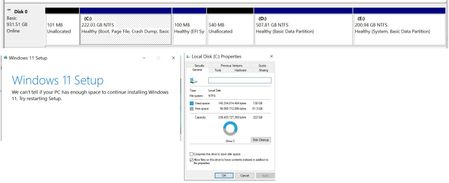

The screenshot confirms that C: has about 91.3 GB free, so enlarging that partition is not the obvious first fix. It also shows a 100 MB EFI system partition beside 540 MB of unallocated space, making a system-partition check plausible, but the message does not prove the cause. Back up the computer before changing any partition. Install Windows 10 updates, restart, disconnect nonessential USB devices, and try the upgrade through Windows Update, which Microsoft recommends before Installation Assistant. If it fails again, record the error code and inspect C:$WINDOWS.~BT\Sources\Panther\setuperr.log, followed by setupact.log, for the first relevant storage or partition error. Do not create, format, or delete EFI partitions based only on this screenshot. If the log identifies the EFI or system-reserved partition, give the screenshot and log entry to Microsoft support or an experienced technician so the partition can be extended safely