Forum Discussion

wsophia
Mar 06, 2025Bronze Contributor
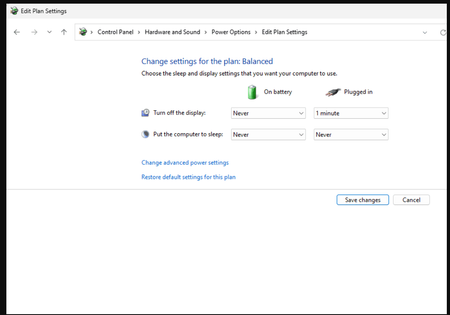
"Turn off the display" (Plugged in) timeout puts the computer to sleep? I can't ping the laptop
I have a Lenovo YOGA 9i Pro running Windows 11 Pro. It's connected to a CalDigit TS4 Thunderbolt dock. Ethernet is connected to the TS4 dock. (DisplayPort cable from TS4 dock connected to Monitor)...

lyverasolen
Mar 06, 2025Iron Contributor
Your laptop is sleeping instead of just turning off the display. Try this:
- Power Settings: Set Sleep to Never (plugged in).
- Advanced Power Options: Disable Sleep and Hibernate.
- Lid Settings: Set When I close the lid to Do nothing.
- Network Adapter: Uncheck Allow the computer to turn off this device to save power in Device Manager.
This should keep your laptop awake and online, even when the screen turns off!