Forum Discussion

majornuts
Feb 28, 2023Copper Contributor
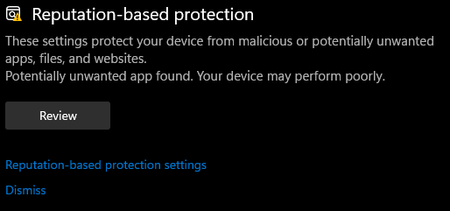
Reputation-based protection unable to dismiss warning.
the dismiss option does not work.... And to add insult to injury the "give us feedback" does not work.

Reza_Ameri
Feb 28, 2023Silver Contributor
Are you facing this issue with other menus?
Since when this problem started?
Try run Windows Update and download and install all updates and restart your PC.
You may open start and search for feedback and open the Feedback Hub app from there.
Since when this problem started?
Try run Windows Update and download and install all updates and restart your PC.
You may open start and search for feedback and open the Feedback Hub app from there.
 majornutsFeb 28, 2023Copper Contributorfeedback butten works other places in the settings menu.
after downloading battlefield heros the game form there website.
updated and reboot did not change anything.
it cant be dismissed and just lingers there always wanting access.- Reza_AmeriMar 01, 2023Silver ContributorTry open start and search for cmd or command prompt and run it as administrator and then run the following command:
sfc /scannow
Press enter and let it runs and see what the result is.