Forum Discussion

Rare Display Panel on my Windows 11 Laptop!
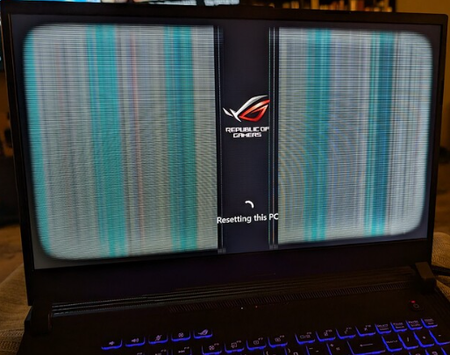

The vertical bands in the photo, visible while “Resetting this PC” is displayed, suggest more than ordinary browser flicker. First, back up files if Windows starts. Restart and check whether the lines appear on the manufacturer logo or UEFI setup screen. Connect an external monitor and compare both displays. If the external image stays clean while the panel fails, the panel or display cable needs service; if both show corruption before Windows loads, stop resets and arrange manufacturer diagnostics for the graphics hardware. If firmware screens are clean and the issue occurs only in Windows, press Windows+Ctrl+Shift+B, then open Task Manager. If Task Manager flickers too, update the display driver from the laptop manufacturer; if the issue began after an update, roll the driver back in Device Manager. If Task Manager remains stable, update or remove the affected app. Repeated Windows resets will not repair a failing panel or cable.