Forum Discussion

JohnRitchey
Nov 20, 2025Copper Contributor
Problem with transition between multiple monitors
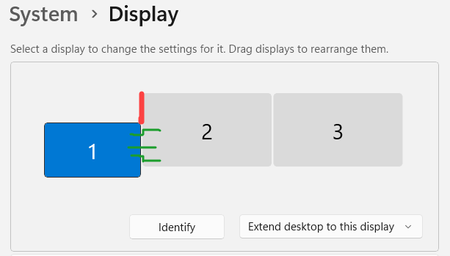
After the Windows 11 upgrade at work, I'm having a problem with my cursor falling to the top of the next display rather than stopping. This image may explain it better. Display 1 is my laptop and s...

asperity
Nov 21, 2025Iron Contributor
This is the most likely solution:
- Press Win + I to open Settings
- Go to System → Display
- You'll see a diagram representing your three monitors
- Click and drag the displays to match your exact physical arrangement:
- Display 1 (Laptop) should be positioned exactly centered between Display 2 and Display 3
- Ensure there are no gaps between the monitors in the virtual layout
- The tops and bottoms should align perfectly in the diagram
 JohnRitcheyNov 22, 2025Copper Contributor
That diagram accurately reflects my monitor setup. Small laptop monitor is on the left and two much larger desktop monitors sit in the center and right.
Going from right to left across display 2 to 1 … if the cursor is at the bottom of 2, it jumps up. If up a little higher, it goes straight across. If closer to the top of 1, it jumps down. These are the green lines. If the cursor hits anywhere on the red line, it should stop. Instead, it pops down to the top of monitor 1.
if i raised the bottom of 1 to match the bottom of 2, it makes the cursor jump worse.