Forum Discussion

PC 1 sees PC 2's shared drives, but PC 2 can't see PC 1's
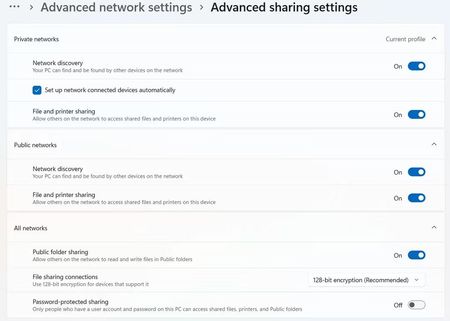

Wake on LAN is unlikely to cause this: it wakes PC 1 but does not control Windows file-sharing discovery or permissions. Since it fails only one way, test PC 1 as host. Make sure both PCs are on the same private network. On PC 1, open Settings, Network and internet, Advanced sharing settings, and turn on Network discovery plus File and printer sharing under Private. Confirm the shared folder’s Sharing permissions and its Security permissions both allow the account used from PC 2. From PC 2, try opening \\PC1-name and then \\PC1-IP-address in File Explorer; an IP result but not a name result points to name resolution, not Wake on LAN. Also ensure the Function Discovery Provider Host and Function Discovery Resource Publication services start automatically. If only the Ethernet-to-Wi-Fi path fails, test with both PCs on the same connection type before changing router settings.