Forum Discussion

Dutis
Nov 23, 2024Copper Contributor
Other System icons
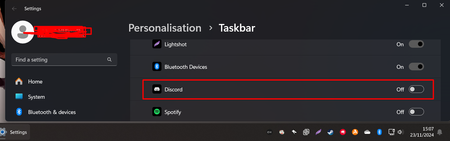
I am having issue where i need to go to Taskbar Setting every few weeks. For some weird reason Windows 11 decides to turn off Discord on Icon off in Taskbar Settings -> Taskbar -> Other System tray...

Holaway
Feb 17, 2025Bronze Contributor
To prevent Discord from being disabled in the system tray on Windows 11, try these steps:
- Update Discord: Ensure you're using the latest version of Discord.
- Re-enable in Settings: Go to Settings > Taskbar > Other system tray icons and turn Discord back on.
- Check Discord Settings: Open Discord, go to User Settings > Windows Settings, and ensure Run on startup and Minimize to tray are enabled.
- Reinstall Discord: Uninstall Discord, then download and install the latest version from the official website.
- Check for Windows Updates: Ensure your Windows 11 is up-to-date.
If the issue persists, consider reaching out to Discord support for further assistance.
 mmhp87Feb 17, 2025Copper Contributor
Can you please explain in more detail how this procedure is going to work? toget windows to regognize Discord and apply the settings made in Step 2 after future updates of discord when it is to be expected that the Installation Path (%USERPROFILE%\AppData\Local\Discord\app-1.0.9182\discord.exe) is going to change to the next version number?