Forum Discussion

SolvingProblem0
Aug 27, 2026Tin Contributor
Old Display Driver version Continues to Appear in Windows Update Advanced Option
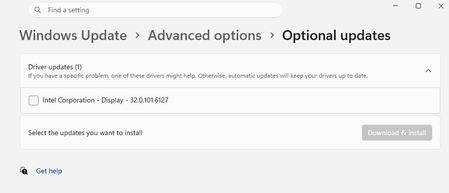
I have noticed an issue related to the display driver in Windows 11 Pro version 25H2. The same driver version repeatedly appears under Windows Update > Advanced Options, even after I have ins...

SmoothGaming-4739
Aug 29, 2026Tin Contributor
Don't have to worry about this. Just make sure you have proper new version installed and as for this old version show by windows, just try to hide it and it won't appears. To do it:
- Download Microsoft Update Hide Tool (wushowhide.diagcab) - https://download.microsoft.com/download/f/2/2/f22d5fdb-59cd-4275-8c95-1be17bf70b21/wushowhide.diagcab
- Open the Microsoft update hide tool (wushowhide.diagcab). Click on "Hide Update," then select this "Intel Corporation - Display - 32.0.101.6127" and click on next.
- The update you selected will be shown as fixed on the next screen.
- Now restart your laptop and check windows update if it is gone.
 SolvingProblem0Aug 31, 2026Tin Contributor
I followed the procedure you recommended & restarted the device as instructed. However, the issue remains unchanged. Also there is a slight mistake in your fourth option. This is a desktop computer, not A laptop.