Forum Discussion

KB5101650 breaks Microsoft Store app update toggle (even for admins)
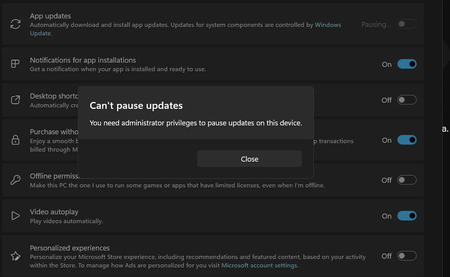

Hello,
I had the same issue for weeks through multiple clean reinstalls on Windows 11 Pro 25H2: Microsoft Store showed “You need administrator privileges to pause updates”, even though my Microsoft account is an administrator and the account is correctly a member of the local Administrators group.
I eventually found a workaround that fixed the Store pause function for me:
HKEY_LOCAL_MACHINE\SOFTWARE\Microsoft\Windows\CurrentVersion\InstallService → Permissions → Users → enable “Full Control”
HKEY_LOCAL_MACHINE\SOFTWARE\Microsoft\Windows\CurrentVersion\InstallService\State → Permissions → Users → enable “Full Control”
After changing those permissions in Regedit while signed in with my normal user account, I could immediately pause Microsoft Store updates without any error. I did not even have to select a pause duration first.
There is another important detail that may help explain what is happening. If I enable and sign in to the built-in Windows Administrator account, without linking it to my Microsoft account, pausing Store updates works normally without changing these registry permissions.
My normal Microsoft-linked account and the built-in Administrator account both have administrative privileges, but they do not run applications with exactly the same effective security token under UAC. A normal administrator account normally runs applications such as Microsoft Store with a filtered, non-elevated token until elevation is explicitly required, while the built-in Administrator account can behave differently depending on Admin Approval Mode.
That may explain why the Store operation succeeds under the built-in Administrator account but receives Access denied under my normal administrator account.
However, that does NOT explain the actual regression.
The same personal Microsoft-account setup worked normally for years, and this problem only started appearing recently. It also returns after clean Windows installations. Therefore, UAC behavior by itself cannot explain why Store / InstallService suddenly no longer has the effective permissions it previously had.
This makes me suspect a regression somewhere in the interaction between Microsoft Store, InstallService, UAC/effective permissions, or the default permissions applied to the InstallService registry keys. I cannot confirm which component is responsible.
In my case:
- My normal Microsoft-linked account is correctly a member of Administrators.
- Store / InstallService still receives Access denied for the pause-update operation.
- The built-in Administrator account does not have the same problem.
- Granting Users Full Control on the two affected InstallService registry keys immediately makes the pause function work again.
- The issue returns after clean Windows installations.
- The registry workaround only fixes this specific Store pause problem.
- Other Store / Store-SDK / InstallService / LiveID / CloudStore errors remain present and are not fixed by this workaround.
Because of that, I consider the registry change a workaround and diagnostic clue, not a permanent fix. Windows should not require users to manually grant broad write permissions to system registry keys just to use a normal Microsoft Store function.
The other Store / InstallService / LiveID / CloudStore errors may or may not share the same root cause. I am including them for reference because they may help Microsoft correlate what changed, but I do not want to claim that they are all caused by the same bug without evidence.
I documented the original issue, reproduction steps and additional diagnostic Store-SDK / Store / InstallService / LiveID / CloudStore logs here:
Microsoft Q&A: “Microsoft Store: ‘You need administrator privileges to pause updates’ on Windows 11 Pro 25H2”
https://learn.microsoft.com/en-us/answers/questions/6005908/microsoft-store-you-need-administrator-privileges
If you have the same error, it may be worth checking the effective permissions on those two InstallService registry keys and comparing your Store / InstallService logs with the ones in that thread.
For Microsoft, I think the important part is to reproduce this on a clean Windows installation and compare:
- a normal Microsoft-linked administrator account;
- a normal local administrator account;
- the built-in Administrator account;
- the effective access tokens and integrity levels used by Microsoft Store / InstallService;
- the default ACLs and ownership of InstallService and InstallService\State;
- why PauseAutoUpdateAsync receives Access denied;
- which Windows / Store / InstallService component creates or restores these permissions during setup and servicing;
- whether a recent Windows, Store, InstallService or account/security change altered the expected permissions or token handling.
Until Microsoft identifies the underlying cause, I would treat the registry permission change only as a temporary workaround.
If you can reproduce the same behavior, it is worth reporting it through Feedback Hub as well and including the exact Store / InstallService errors and reproduction steps so Microsoft has more comparable reports.