Forum Discussion

KB5101650 breaks Microsoft Store app update toggle (even for admins)
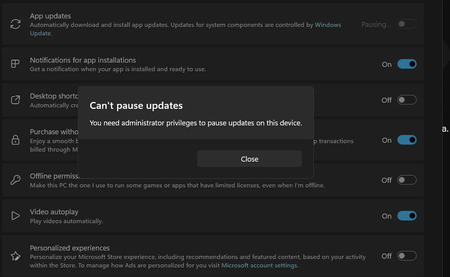

Hello,
I had the same issue for weeks through multiple clean re-installs on Windows 11 Pro 25H2: Microsoft Store showed “You need administrator privileges to pause updates”, even though my Microsoft account is an administrator.
I eventually just found a workaround that fixed the Store pause function for me:
HKEY_LOCAL_MACHINE\SOFTWARE\Microsoft\Windows\CurrentVersion\InstallService → Permissions → Users → enable “Full Control”
HKEY_LOCAL_MACHINE\SOFTWARE\Microsoft\Windows\CurrentVersion\InstallService\State → Permissions → Users → enable “Full Control”
After changing those permissions in regedit with my user account, I could immediately pause Microsoft Store updates without any error.
In my case this has been reproducible after clean Windows installations, so I currently consider it a workaround rather than a permanent root-cause fix. It fixes the Store update-pause permission problem, but it does not resolve the other Store / InstallService / LiveID errors I have been seeing.
I documented the original issue, reproduction steps and additional Store-SDK / InstallService / LiveID logs here:
Microsoft Q&A: “Microsoft Store: ‘You need administrator privileges to pause updates’ on Windows 11 Pro 25H2”
https://learn.microsoft.com/en-us/answers/questions/6005908/microsoft-store-you-need-administrator-privileges
If you have the same error, it may be worth checking the permissions on those two InstallService registry keys and comparing your Store / InstallService logs with the ones in that thread. Please note that its a bug and issue that affects many users but Microsoft devs do not have recognized yet.