Forum Discussion

Issues with Windows Security Defender Antivirus
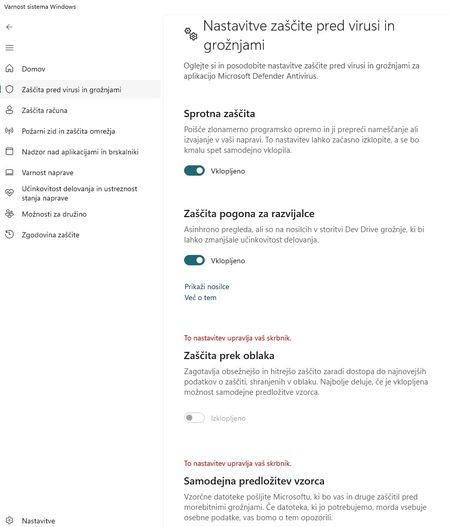

The screenshot confirms both settings are policy-controlled; local administrator status does not unlock them. Microsoft documents that Group Policy or endpoint-management settings make the Windows Security controls dimmed. First check Settings, Accounts, Access work or school and determine whether the device is connected to an organization; also review installed management agents or security suites. In an elevated PowerShell session, record MAPSReporting and SubmitSamplesConsent with Get-MpPreference before changing anything. Then identify the policy source through Intune, Configuration Manager, or Group Policy rather than deleting registry values by hand. For an unmanaged personal PC, remove or change the relevant policy through its intended administration tool, refresh policy, restart Windows Security, and verify the values again. Keep cloud protection enabled and use safe-sample submission unless you have a documented reason to choose another setting. If no management source is found, collect the policy results and Defender support logs for Microsoft support.