Forum Discussion

Is my 1070 cooked?
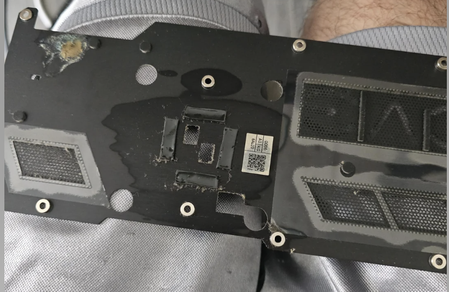

1. Basic examination
1. Symptom observation: screen artifacts
2. Sudden black screen or driver crash
3. Temperatures above 90°C during gameplay/rendering
4. Abnormal fan noise or stalling
2. Software testing GPU-Z:
1. Download and run GPU-Z
2. Check:
3. Temperature (Idle should be <50°C, load <85°C)
4. Power consumption (whether TDP is abnormal)
5.Clock frequency (compare standard value: Boost 1683MHz)
3.DDU clean installation driver:
1. Download Display Driver Uninstaller
2.Run in Safe Mode → Uninstall Driver Completely
3.Install the latest NVIDIA driver
4. Stress test FurMark:
1. Run FurMark for 5 minutes
2. Normal: Temperature rises steadily, no screen abnormality.
3. Danger Signal: Temperature >95°C or black screen immediately.
5. Clean the dust and heat sink:
1. Use compressed air to clean the heat sink
2. Replace the silicone grease to increase the chassis fan to improve the air ducts