Forum Discussion

How to highlight active instance of a program when hovering over combined taskbar button?
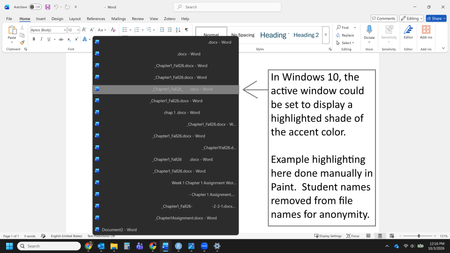

You want to keep Word windows combined on the taskbar but have the currently active document’s thumbnail clearly accented when you hover over the group. Windows 11 does not expose a supported setting for changing the highlight of one thumbnail inside that combined preview. Accent-color settings affect Windows surfaces, and the documented taskbar controls only change whether buttons are combined: Always, When taskbar is full, or Never. Because you need the combined layout, changing those options will not add the Windows 10-style active-preview color you remember. The supported ways to identify the active window are Task View with Windows+Tab, Alt+Tab, or temporarily choosing Never combine so every window has its own labeled button. High Contrast can improve overall visibility but cannot target only the active preview. Avoid registry tweaks because Microsoft does not document one for this behavior. Submit the feature request through Feedback Hub under Desktop Environment > Taskbar.