Forum Discussion

How to bypass windows 11 system requirements during installation on an old Laptop?
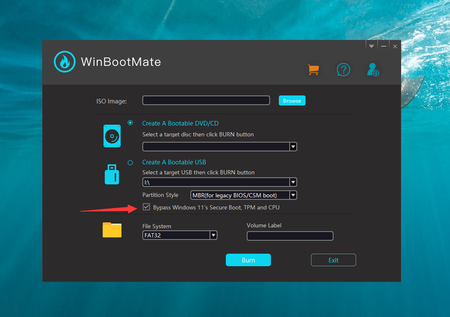
- Feb 21, 2024
Apparently, the CPU and RAM don't meet the Windows 11 system requirements. The CPU should be Intel 8th Gen and RAM should be 8GB or more.
One of the easier methods to install Windows 11 on unsupported hardware is to modify the Windows Registry during the installation process. This method involves creating a Windows 11 installation media, booting from it, and then making a registry change before the compatibility check.1. Go to the official Microsoft website to download the Windows 11 ISO file.
2. Use tools like Windows Media Creation Tool to create a bootable Windows 11 USB drive from the ISO file.
3. Boot your PC from the USB drive and start the Windows 11 installation process. Follow the prompts until you reach the screen where it says your PC can't run Windows 11.
4. Press Shift + F10. This key combination opens a Command Prompt window during the installation process.
5. In the Command Prompt, type regedit and press Enter to open the Registry Editor. Now, navigate to HKEY_LOCAL_MACHINE\SYSTEM\Setup.
6. Right-click on the Setup key, select New > Key, and name it LabConfig. Inside the LabConfig key, create new DWORD (32-bit) Value entries with the following names and values:
BypassTPMCheck and set its value to 1.
BypassSecureBootCheck and set its value to 1.
Create BypassCPUCheck and set its value to 1.7. Close Registry Editor and the Command Prompt, then continue with the installation process. The setup should now bypass Windows 11 system requirements.


- Karl-WESep 20, 2024MVPYou misuderstood my question. Can you boot Windows 10 from the current storage (not meant booting Windows 11 setup)?
Again a new SSD does not necessarily improve the situation, which is complicated to explain in a forum. the goal would be to disable VMD / RST and install Windows 11 on your existing disk. I cannot rate without screenshots or remote access why you cannot see the drive.
Likely this is because Windows Setup does not see the drive because it is marked hidden / offline as mentioned before to check via diskpart, or again you need the mainboard driver for stoage and load it to the setup.
If you need a driver for storage in setup though, it is clear it is not AHCI - which it should be.
As your issue is not very related to the topic I would rather ask you to contact me via DM. - Anubis10Sep 19, 2024Copper ContributorIt boot up and let me put my window 11 keys and then say that there’s no storage space so I assume a new ssd might change that