Forum Discussion

How to bypass windows 11 system requirements during installation on an old Laptop?
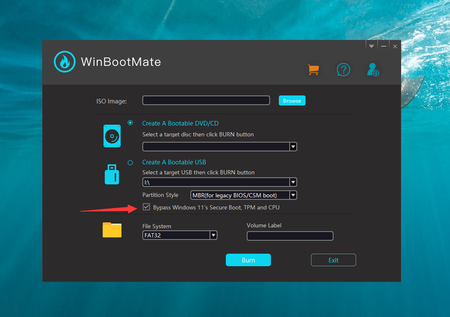
- Feb 21, 2024
Apparently, the CPU and RAM don't meet the Windows 11 system requirements. The CPU should be Intel 8th Gen and RAM should be 8GB or more.
One of the easier methods to install Windows 11 on unsupported hardware is to modify the Windows Registry during the installation process. This method involves creating a Windows 11 installation media, booting from it, and then making a registry change before the compatibility check.1. Go to the official Microsoft website to download the Windows 11 ISO file.
2. Use tools like Windows Media Creation Tool to create a bootable Windows 11 USB drive from the ISO file.
3. Boot your PC from the USB drive and start the Windows 11 installation process. Follow the prompts until you reach the screen where it says your PC can't run Windows 11.
4. Press Shift + F10. This key combination opens a Command Prompt window during the installation process.
5. In the Command Prompt, type regedit and press Enter to open the Registry Editor. Now, navigate to HKEY_LOCAL_MACHINE\SYSTEM\Setup.
6. Right-click on the Setup key, select New > Key, and name it LabConfig. Inside the LabConfig key, create new DWORD (32-bit) Value entries with the following names and values:
BypassTPMCheck and set its value to 1.
BypassSecureBootCheck and set its value to 1.
Create BypassCPUCheck and set its value to 1.7. Close Registry Editor and the Command Prompt, then continue with the installation process. The setup should now bypass Windows 11 system requirements.


major concerns are the following:
- Microsoft may not automatically upgrade your version in annual releases
- The device will be very slow and CPU load very high, as it needs to emulate security related tasks that depend on virtualization
- older drivers especially Intel HD graphics do not support Core Isolation
I have stopped using these "tricks" for these reasons, as the performance was greatly reduced. Thus the reasons why the system requirements are not arbitrary, even though the communication about the "why" could have been better. There is lot of rumour about these requirements, still.
Sure thing everyone should use fTPM (in CPU) instead of TPM chips (outside CPU on mainboard).

Karl-WE Well, If we all could afford to upgrade PCs every 2-3 years, it would make sense, but we can't. The internet has gone from a fun past time to necessity. Not everyone can afford to upgrade constantly and personally, I don't need a OS to basically force that on me.
I have no doubt that these requirements will benefit for a lot of people, but I like options and I want the option to bypass the requirements because I will take responsibility for my own security. I just updated my 12 year old laptop to 10 from 7 and it ran for years after the lack of support for 7 with no problems. I keep images of the C drive, so if someone hacks it...wipe and reinstall the image with OS.
The main concern is limitations of a web browser over time with an old OS. I still use XP and even win 98SE on really old machines that still work, but are not online for specific software/hardware situations, I'll will still use older machines in win 10 if I have to and cannot easily upgrade to 11. Updates really aren't a major concern for me as it would be for a business, which I certainly agree they should upgrade properly.
I like to gauge my own concerns of security based on my usage which can be totally different from other people. Fortunately, my main machine will be upgraded to 11 as it meets the requirements....other machines I use, maybe not so much, but they still work well and are of use to me.
- Karl-WEApr 29, 2024MVP
snarfdude could you be asked to share your CPU model, GPU and mainboard?
No offence but the Windows 11 HW requirements are usually not locking out 2-3 years old computers.
To add on MenyP posting you could use rufus and create a bootable Stick for older hardware.
The new minimum is TPM 2.0 (fTPM in CPU will be better, more secure), Secure Boot and SSE 4.2, starting with Windows 11 24H2.
Without the SSE 4.2, which is supported for longer time by CPUs, you won't be able to boot Windows 11 anymore, sources report.
You can check your CPU e. g. Intel in the Intel ARK database, to check the SSE 4.2 support.
With yours posted I am inclined to assist you, if then you accept much lower security and no support from Microsoft.
Thank you for your posting your HW Infos. This would help to make better decisions on if it makes sense to bother with Windows 11 upgrades on older HW.
As for Windows 98SE and XP I can tell you that these can barely use the Internet anyway, even if connected. Still you could be compromised, but due to their common lack of tls 1.2 there is not much to reach online in terms of browsing.
Encountered that when I tried to revive old HW for good old games. It was a nightmare and waste of time 🙂
 ethex_officialMay 21, 2024Copper Contributor
Karl-WE My PC isn't old by any means, yet it is incompatible with Win11 as well.
My rig consists of this hardware, running Windows 10:
MB: ASRock B550M/ac
CPU: AMD Ryzen 7 3700X
GPU: MSI Nvidia GeForce RTX 3070
RAM: 32GB DDR4 3,600MHz
as well as other parts, obviously, that were excluded considering what I am assuming is their lack of importance in the subject, such as the PSU.- Karl-WEMay 22, 2024MVP
ethex_official thank you for sharing specs. In this case your PC is fully compatible with Windows 11.
Please update your BIOS. This will usually change all settings required for security and you no longer need tricks. Download the latest Windows 11 23H2 iso from Microsoft and upgrade, keep files and settings.
Make sure the Windows 10 uses a Microsoft Account, passwordless at best (you can remove the password and switch to Microsoft Authenticator in the profile webpage.
Then leverage Windows Hello pin 4 or more digits which is the saved into the fTPM of your CPU.
Enable security features in Windows 11 like Core Isolation in Windows Security.
When using Edge, in Windows security App control enable the additional security features for MS Edge. It's still a Chromium Browser, including all extensions, like Google Chrome, Opera etc but offers better security.
If default bugs you you can change privacy settings and search engine or side bar.
Does this help? Do you have further questions?