Forum Discussion

How (if possible) do I remove thi
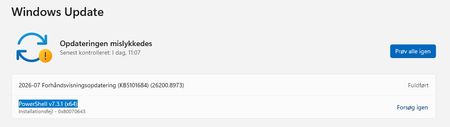

The screenshots show Windows Update failing on PowerShell 7.3.1 with 0x80070643 while Apps lists two 7.6.3 entries. This points to an older MSI/Microsoft Update registration, not Windows downgrading the active shell. First open PowerShell 7 and run $PSHOME; Program Files\PowerShell\7 usually indicates MSI, while WindowsApps indicates MSIX. Then run winget list --id Microsoft.PowerShell --upgrade-available to see what WinGet recognizes. Choose one installation method: retain MSI if you need system-wide deployment or remoting; otherwise retain MSIX/WinGet. Remove only the redundant entry through Programs and Features for MSI or Start > PowerShell 7 > Uninstall for Store/MSIX, restart, then check Windows Update. If keeping MSI, run the current MSI again to repair its registration. If you only want to stop PowerShell Microsoft Update, rerun that MSI and clear its first update checkbox. If the 7.3.1 offer persists, capture Update history and contact Microsoft Support rather than editing update databases.

Thank you for your advice, but that is far too complicated for me to understand.
But I have uninstalled every instance of Powershell, restartet several times, but it is still there. And when I then try to install the PowerShell 7.3.1 (which fails) it keeps on coming up with the 0x80070643 error.
I have used at least 10 hours on this, and I'm giving up now and just try to ignore the error.
Have a nice day/evening 👍