Forum Discussion

How (if possible) do I remove thi
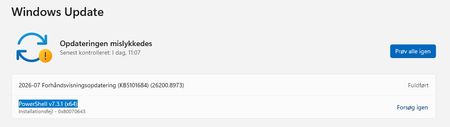

The screenshot shows an old PowerShell 7.3.1 update failing with MSI error 0x80070643; it is not a reason to remove or downgrade the installed PowerShell 7.6.3. Keep the newer version.
The two PowerShell entries in Programs and Features suggest that Windows Update may be finding an old or damaged installer registration. First, open Windows Terminal and run: pwsh -v
If it reports 7.6.3, download and keep the current x64 installer from the official PowerShell release page. Then, in Settings > Apps > Installed apps, select the current PowerShell entry and choose Modify or Repair if that option is available. Restart and try Windows Update once more.
If Windows Update still offers only PowerShell 7.3.1, hide that specific update with Microsoft’s Show or hide updates troubleshooter. Select Hide updates, tick PowerShell v7.3.1 (x64), and complete the wizard. This stops Windows Update from repeatedly retrying that obsolete package while leaving the current PowerShell installation untouched.
Do not delete PowerShell folders or remove registry entries by hand. If the old update returns even after hiding it, report it through Feedback Hub with the screenshot, the installed version, and error 0x80070643; that points to a Microsoft Update detection issue rather than a missing PowerShell update.