Forum Discussion

File History has stopped functioning
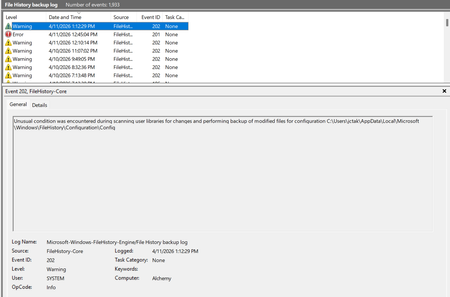

I have just installed the most recent update available, newly available today, 2026-09 Security Update (KB5129195) (26200.9457) and the external hard drive back-up inability problem still persists. As this was a second Security Update within a month, (only a week since the last one), I assume there must have been lots of bugs in last week's one.
Many of us want to backup to an external hard drive.
Get a grip Microsoft!
Please give us a fully functioning back-up ability
I’m also experiencing this on Windows 11 25H2, build 26200.9457.
File History reports “Reconnect your drive” despite my Toshiba 2 TB USB drive being connected and readable. After reselecting it, File History shows as off, and clicking “Turn on” does nothing visibly, even after restarting.
Checks so far:
- The drive is NTFS with roughly 1.7 TB free.
- The File History service is running.
- Both local and external backup catalogues were last modified on 4 September.
- The local Configuration folder contains a zero-byte InconsistentState file dated 16 September.
- The latest BackupLog entries are from 9 September, concerning excessive path lengths in Unity cache files. There are no newer errors for the failed activation attempts.
I haven’t confirmed whether a Windows update caused this. Is there a confirmed fix, or a way to collect useful diagnostics without deleting the existing backup?