Forum Discussion

File History has stopped functioning
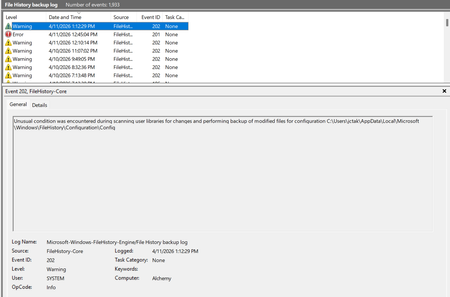

I am one of the victims, and I am furious with Microsoft for corrupting File History. Since the KB5101684/KB5120249 update, files can still be backed up to the D: drive normally. However, the "Last Backup" time in File History is not updating correctly. Newly created or saved Word documents, images, videos, etc., still show "No previous version available" in "Content → Previous Versions". No folders are corrected; their dates are automatically updated. File History was forcibly disabled after KB5124008/KB5120249, resulting in an "InconsistentState" entry in C:\Users\User\AppData\Local\Microsoft\Windows\FileHistory\Configuration.
This is no longer a simple matter of "the time on the screen not updating."
This makes me reasonably suspect that the File History settings, indexing, or internal state management mechanism may be malfunctioning after Windows updates.
If files are indeed backed up, but Windows cannot correctly track, display, and restore versions, then this is a very serious backup reliability issue for users.
Microsoft, please stop being silent. Please answer Windows 10/11 users directly: Did KB5101684, KB5120249, and subsequent updates cause File History regression? If not, please provide technical evidence to explain the true cause.
If so, please acknowledge, investigate, and fix it as soon as possible. What we need is a formal answer and a real fix, not one temporary workaround after another. Please, Microsoft technical teams, take this issue seriously.
 dan-o-gramSep 22, 2026Copper Contributor
100% agree. My File History backup is definitely not working since early September. This is deeply frustrating to the point of questioning whether Microsoft have completely given up on supporting this. I am a long time OneDrive user and value it for many reasons, but I very deliberately run a dual backup strategy that uses File History and local hard drives as well for certain files (darn sight quicker and I have full security control). Seems like I need to spend time and money with 3rd party providers rather than being able to simply rely on the native File History feature any longer. Big shame MS.
 MikeAnnandaleSep 09, 2026Tin Contributor
Makes me want to switch to Apple. If it was 30 years ago I could make a batch file as a primitive and sloppy substitute but I don't even understand DOS anymore . . .