Forum Discussion

File History has stopped functioning
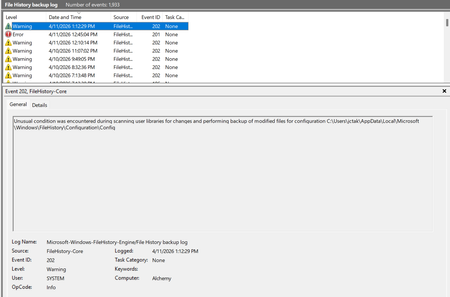

i be able to fix it but new problem keep showing up
first- i found out the File History stop updating the file's newer version, latest backup in File History is around 1-2 months ago
- I go to delete File History's files to set it up anew > but File History not accepting my drive > i find solution in the internet of deleting File History's cache, fixed > but File history now won't run, clicking "turn on" does nothing, seem to run but then stop, won't turning on > find solution in this site by putting code in CMD as administrator, fixed
BUT NOW, it duplicates files even if the file changes nothing, and as because it keep duplicating, the File Restore menu of File History won't show anything; it keeps saying that "File History is running for the first time..." > i continues to try, but I'm stuck here, files keep duplicating in File History's folders and won't allow me to open its menu to restore file, also there is no version of the file that is already has its backup in File History's folders
So yeah 😅 darkness on all sides, it working but can't use it to restore anything now, even if it keep duplicating the file, so i guess i can only manually pick the file's backup now