Forum Discussion

File History has stopped functioning

File History Fixed! - Sort of...
Windows Account: Using Local Account
OneDrive: Disabled and all folders deleted
Backup Hard Drives: WD My Passport Ultra (3 TB, USB) or USB thumb drives
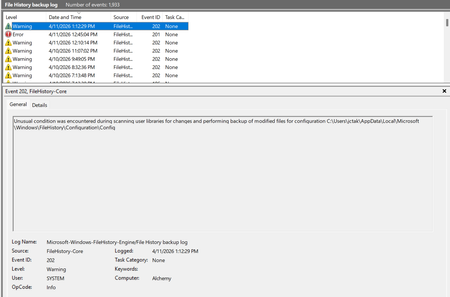
So I've had this problem recently, I don't know when it actually started because I haven't used it lately, but the symptoms are the same as the above posts. File History seemed to work but no files saved in the Data folder. I've spent 2 days trying every fix I can find and I finally got it to work by uninstalling Microsoft KB101650 Security Update. I guess I could try re-installing it, but I hate to take a chance on it. Good Luck to All!
Update: After opening Windows Update these 2 Security updates were there to be installed:
KB101650 and KB100998
I saw no way to opt-out of either of these as Windows Update said they would be installed in the next restart, so I went ahead with the restart and installed them. File History did work OK after the install. So, was there something wrong with KB101650 or was it just a bad install? I'm sure I'll never know.
Update: Problem came back when I tried to switch to a different drive for the Backup. I un-installed KB101650 again which has fixed the problem for now. I've delayed any Windows Updates so that it does not get re-installed. If this problem keeps coming back then I'll just use some other backup method of which there are many to choose from.