Forum Discussion

FinneasHayes
Mar 13, 2026Iron Contributor
Does the Phone Link app in Windows 11 now allow opening apps without unlocking the phone?
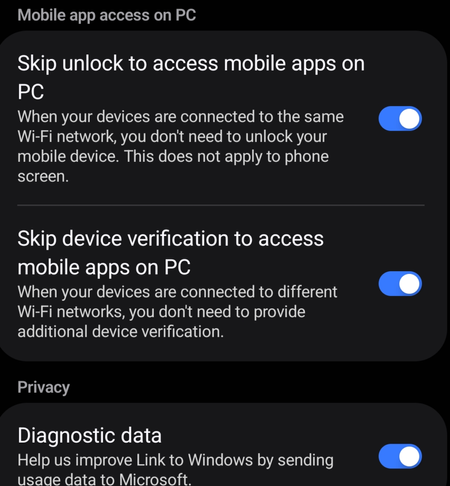
A few years ago, Microsoft removed the ability to open apps without unlocking the phone in the "Phone Link" feature. Yesterday, I discovered that this feature has become effective again after enablin...

JackSteel
Mar 13, 2026Iron Contributor
In newer versions of Windows 11 Phone Link (with supported Samsung/Android devices), you can open phone apps from the PC without manually unlocking the phone, as long as a specific setting is enabled.
Check this on your phone:
Phone → Settings → Advanced features → Link to Windows → Turn on “Allow access to phone apps while locked”
(or a similar option like “Open apps without unlocking”, wording may vary by device/version).
When this is enabled, Phone Link can launch and mirror apps even if the phone screen is locked. If the option is missing, it usually means the phone model or software version doesn’t support it.