Forum Discussion

hulihele60
Oct 11, 2024Copper Contributor
Dismissing an update
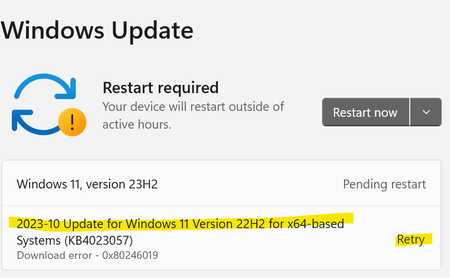
I have this update that keeps trying to download and would like to dismiss it I have tried wushowhide tool but it does not show up on the list i

S-sofia
Oct 22, 2024Tin Contributor
Open Control Panel: Search for the Control Panel in the Start menu.
Go to Programs: Click on Programs and then View installed updates.
Find the Update: Locate the update you want to remove, right-click it, and choose Uninstall.
Alternatively: Go to the Microsoft Update Catalog and search for the specific update. Download the uninstall tool if available.
Go to Programs: Click on Programs and then View installed updates.
Find the Update: Locate the update you want to remove, right-click it, and choose Uninstall.
Alternatively: Go to the Microsoft Update Catalog and search for the specific update. Download the uninstall tool if available.