Forum Discussion

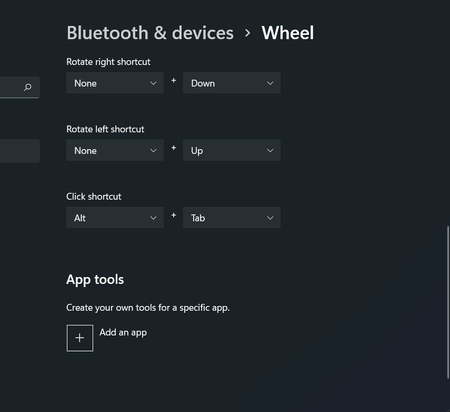
Crash when trying to "add an app" in "Wheel" (Surface Dial) settings

 Microsoft
Open Settings and browse to Network & Internet, then Advanced network settings, then Data Usage.
From the Data usage screen, type "wheel" and choose Wheel settings in the Find a setting box (under your profile pic).
Wheel settings should now be stable for this session.
If you exit the settings app, you need to repeat these steps, even if you haven't rebooted.
Hope this helps until a fix is rolled out.

after i did what you suggested, I was able to get into the "add an app"
once i selected the app that i wish to app, the windows crashed again.
so i tried the same step again, except this time, the wheel setting crash immediately once i clicked it.
doesn't even let me change the default dial setting now.
even after the reboot, seems the the wheel setting menu is permanently bricked now.
 yfainewApr 10, 2022Copper Contributor
Exact same thing happened to me when I try the fix. Hopefully MS will patch this soon. om500
edit: I was an idiot. I didn't click on the data usage before I search for the wheel. Once I did that it is fine. Make sure you select data usage and click into it before you search.
- Jon-NuoJan 17, 2022Copper ContributorSame here, crashed after choosing the app from the list, very frustrating
- Chris_PrevicJan 19, 2022Copper Contributor
After 2022-01 Cumulative Update for Windows 11 for x64-based Systems (KB5010795):
Confirmed, after selection of app in "Add an App" page, the settings will crash; however, ...
GOOD NEWS: The app will now appear in the "App Tools" list at the bottom of the Wheel settings page and can be customized.
 crystalsprenksFeb 08, 2022Copper Contributor
I did this workaround and now when i open the wheel settings, it just immediately crashes

