Forum Discussion

Cannot add members from my family group to new PC
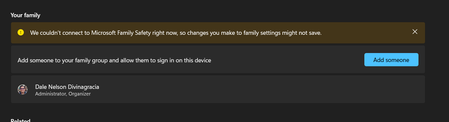

Hello - it gives me slight relief that it is not only me experiencing this. But! I have discovered a solution that is similar to what andadm states above:
- Settings > Accounts > Other Users – click Add Account
- This will pop up:
Click “I don’t have this person’s sign-in information”
- This will then pop up:
Click “Add a user without a Microsoft account”
- The Create a user for this PC wizard will then pop up:
Proceed to create a local account for each of your family.
Note: Before Microsoft Family existed, I remembered that this was how I made different local accounts for different users (re: my family) in my PC about 5 years ago. So, it’s going back to old-school ways of doing things.
- Log in to the account you created. Open Settings and in your Home page, there should be an option to sign in your family member’s MS account:
You should be able to sign in without a hitch.
I know that this is a bit of a roundabout way to handle this bug, but it is a solution that worked for me. Takes more work (the “allow sign-in” in the Accounts > Family was such a time saver), but this will do for now while MS developers (hopefully) fix the bug.