Forum Discussion

Cannot add members from my family group to new PC
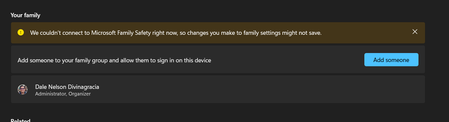

Hello - unfortunately, I have a similar problem, which is persistent and very annoying. Would really appreciate a solution here.
As shown in the screenshot by the user dalenyd above, the Windows settings for Accounts - Family do not synchronize, the error message saying that it was not possible to connect to Microsoft Family Safety right now and that changes you make to family settings might not be saved. The error is persistent and has been there for weeks - I have tried various tips suggested in some online forums without success. I am signed in to Windows with my Microsoft account, the system runs Windows 11 including all current updates.
 dalenydMay 08, 2025Tin Contributor
Hi! Thank you to everybody chiming in. I may have a solution (similar to andadm's solution): After chatting with MS support again and not getting a solution, I decided to install it the way I used to 5 years ago – via local accounts first and logging in all family members one by one. It was time-consuming, but it worked! My laptop now has all my family members' accounts. Here are the steps:
- Settings > Accounts > Other Users – click Add Account
- This will pop up:
Click “I don’t have this person’s sign-in information”
- This will then pop up:
Click “Add a user without a Microsoft account”
- The Create a user for this PC wizard will then pop up:
Proceed to create a local account for each of your family.
Note: Before Microsoft Family existed, I remembered that this was how I made different local accounts for different users (re: my family) in my PC about 5 years ago (). So, it’s going back to old-school ways of doing things.
- Log in to the account you created. Open Settings and in your Home page, there should be an option to sign in your family member’s MS account:
You should be able to sign in without a hitch.
I know this is a bit of a roundabout way to handle this bug, but it is a solution that worked for me. It takes more work (the “allow sign-in” in Accounts > Family was such a time saver), but this will do for now while MS developers (hopefully) fix the bug.