Forum Discussion

Can I turn a screenshot into a hyperlink without saving it first?
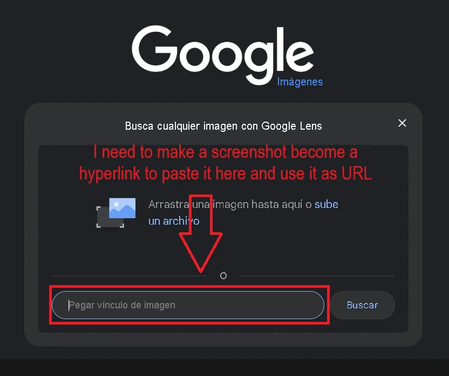

A screenshot cannot directly become a hyperlink. The field shown in your screenshot only accepts the URL of an image that is already hosted online. A screenshot in the Windows clipboard contains image data, not a web address.
If you only want to search with the screenshot, try Windows 11’s built-in visual search:
- Press Win + Shift + S and capture the required area.
- Click the notification to open the capture in Snipping Tool.
- Open the three-dot menu and choose Visual Search with Bing, if your Snipping Tool version provides that option.
- The captured area will be sent to Bing for an image search without requiring you to save it manually.
If the original image is already displayed in Microsoft Edge, you can also right-click it and select Search the web for image.
Windows does not have a built-in option that sends a Snipping Tool capture directly to Google Lens. If you specifically need Google results, Chrome’s Lens feature is still the simplest method.
If you need an actual reusable URL, the screenshot must first be uploaded to a website or cloud storage service. There is no way to create a working public hyperlink from clipboard image data without storing the image somewhere. For personal or sensitive images, direct visual search is safer than uploading the screenshot to a public image-hosting site.