Forum Discussion

Deleted
May 26, 2022Not applicable
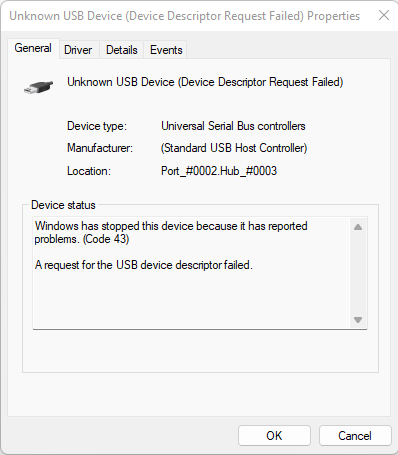
Android Tablet shows up as Unknown USB Device
I have a Samsung Galaxy Tab 3 (Running Android 4.4.2) which I use as a Media Streaming Device. It worked fine on Windows 11, connected and allowed me to access it's storage in file manager...

Reza_Ameri
May 27, 2022Silver Contributor
What steps have you followed to troubleshoot this problem?
Have you tried connecting to a different USB?
Did you install any program or update before this problem started?
Try restart your Android device and try again.
Try restart Windows and try connecting.
Have you tried connecting to a different USB?
Did you install any program or update before this problem started?
Try restart your Android device and try again.
Try restart Windows and try connecting.
Deleted
May 27, 2022Not applicable
I have tried to fix my problem with the following methods:
1. Use a different USB Cable
2. Use a different USB Port
3. Search for drivers for my USB Device with Windows Update
4. Manually install drivers for my USB Device
I have tried the potential fixes you mentioned, unfortunately, neither worked.
- Reza_AmeriMay 28, 2022Silver ContributorIf possible, connect your tablet to a different PC and see if the problem persists?
Try performing a Clean Boot and see if the problem persists?
Have a look at:
https://support.microsoft.com/en-us/topic/how-to-perform-a-clean-boot-in-windows-da2f9573-6eec-00ad-2f8a-a97a1807f3dd- DeletedMay 28, 2022Not applicableUnfortunately, I have no access to a different PC. My friend has a PC running Linux, that may have to do.
I have also tried a Clean Boot, no luck. At least it rules out interference from other pieces of software.- Reza_AmeriMay 29, 2022Silver ContributorIn this case, try open start and search for feedback and open the Feedback Hub app and report this issue.
What is the device manufacturer of your PC?