Forum Discussion

simuuh
Nov 25, 2021Brass Contributor
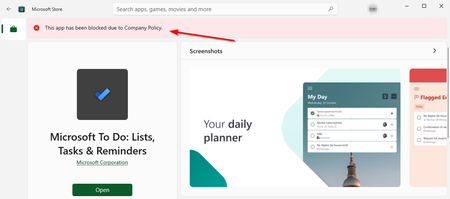
Microsoft Store: this app has been blocked due the company policy
Hi everyone In our organisation, we have limited the apps that can be installed via the Microsoft Store. For some time now, users have been receiving an error message: "This app has been bloc...
- Dec 10, 2021Hi all - Microsoft has pushed an updated Store Version 22111.1401.1.0 that resolves this issue.

Dec 06, 2021
Already resolved. Change the intune setting back to public and private and then again back to private.

lexcyn
Dec 06, 2021Steel Contributor
Interesting - we do not control the Store via Intune and only use GPO to control the private store. I am still working with MS Support.
 JasonHall-AUDec 06, 2021Copper Contributor
lexcyn Interested to see how you go with this... we're seeing the same issue.
Also using GPO to limit to private store, and have AppLocker configured for whitelisting apps. Users see the message on any app, but can still install apps which are whitelisted for them (even though they get this message).
- lexcynDec 07, 2021Steel ContributorSo far disabling/re-enabling the GPO did nothing to fix the issue. I am wondering if this is due to the Business Store retiring next year and MS wanting to move to Intune. I can't find any logical setting where any other policies would control the Store other than Intune - if anyone figures something out I would be really interested.
- Dec 06, 2021
We are full on Intune. So no SCCM or Co-management.
And no GPO's, because the devices are AAD joined.
- lexcynDec 06, 2021Steel ContributorFair enough - we are hybrid joined and are now just co-managing with Intune, so we don't have anything in Intune right now. So we are controlling the Store via GPO. Too bad I couldn't just do what you did to get it fixed! I am now attempting to see if disabling the GPO and re-enabling it will resolve the issue, but I have my doubts.