Forum Discussion

Can't Remove Microsoft Account After Windows 10 ESU Enrollment
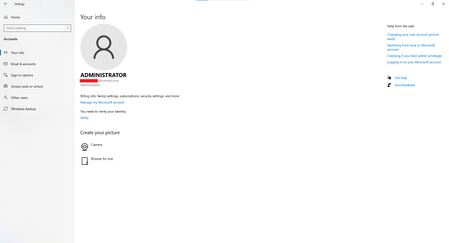

Your situation with the Microsoft account appearing in Windows 10 after enrolling in the Extended Security Updates program is understandable.
 ChrisBedfordSep 04, 2026Copper Contributor
Well that is probably the most unhelpful reply I've seen on this forum so far, and I've see some doozies.
 ianaSystemsJul 03, 2026Copper Contributor
Thank you. Could you please confirm whether this behavior is expected after Windows 10 ESU enrollment, or if there is a supported way to disconnect the Microsoft account?
- ChrisBedfordSep 04, 2026Copper Contributor
I found a way to remove that! 🌞
On the page you posted before, "Your Info" (Start - Settings - Accounts) just below the section that shows your name and email address, there was a line of blue text "Stop signing into Microsoft Automatically" (I might not have remembered the wording exactly). I clicked that, and now that page displays only the user name and "Local Account" and "Administrator". The blue text now reads "Sign in with a Microsoft account instead"