Forum Discussion

windows security smart control is blocking my cpp and exe files and how to fix these?
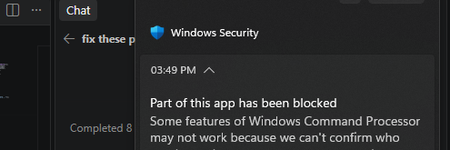

For a locally compiled app, the likely issue is that each new build has neither an established reputation nor a signature Windows trusts. Smart App Control doesn’t provide a per-app “allow this anyway” exception.
To keep it enabled:
- Confirm exactly what was blocked. Your screenshot says “part of an app” and mentions Windows Command Processor. Check the Code Integrity event’s file path and policy details—not just the event number. The blocked component could be a DLL loaded by the process, and another App Control policy could also be involved.
- Sign the finished binaries with a trusted code-signing certificate. For Smart App Control, use a supported RSA-based certificate from a trusted code-signing provider. A self-signed certificate isn’t an equivalent solution. Sign both EXEs and any DLLs you build and distribute, timestamp the signatures, and sign again after every rebuild.
- Verify the signatures, for example with the Windows SDK’s SignTool:
signtool verify /pa /v firoseeyyy.exe
Successful verification checks the signature; it doesn’t guarantee every component will pass the active policy. A trusted signature addresses the unsigned-app issue, but isn’t a blanket exemption from security checks.
signtool verify /pa /v firoseeyyy-console.exe
Microsoft Store distribution is another route to consider for releases, subject to its packaging and submission requirements. For frequent unsigned development builds, a separate development VM is often more practical while leaving Smart App Control enabled on the main PC.
The screenshot doesn’t show your Windows version or build, so it isn’t enough to confirm whether disabling Smart App Control is reversible on your installation. Earlier implementations required a reset or reinstall to enable it again. Check the full version from winver against the current guidance before switching it off; don’t disable it as a test.