windows security
8 Topics
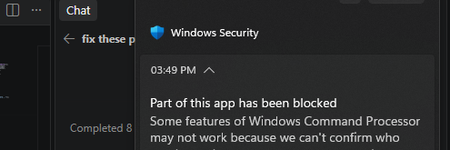
windows security smart control is blocking my cpp and exe files and how to fix these?
I own this Windows PC and Smart App Control is on. It blocks my locally built C++ app, Rose. Code Integrity events 3077 and 3033 show that firoseeyyy.exe and firoseeyyy-console.exe were blocked by code-integrity policy. I want to keep Smart App Control enabled. What signing or distribution options would let Windows trust my app, and would signing with a trusted code-signing certificate satisfy this policy? Please confirm whether Smart App Control can be turned back on after being disabled on my Windows version.110Views0likes1Comment
Hacked account / lack of live agents
I’m extremely frustrated with the process of trying to recover my Microsoft account. My account was compromised, and the person who got into it changed the email address associated with the account. Because of that, my original email is no longer recognized, and I cannot sign in or use the normal password recovery process. I have tried the recovery form, the Sign-In Helper, Microsoft support pages, chat support, phone support, and multiple other suggested recovery routes. Every single option seems to send me back to another automated system, another bot, or another page that eventually circles me back to the same place I already started. I have also run into technical errors when trying to start support chat, including the system trying to use my phone number as a UPN and failing because it expects an email-format username. At this point, I feel like I am being blocked from even reaching a real person who can properly review what happened. This is becoming a serious issue for me because I am a college student and I rely on my personal Microsoft account for access to services, files, applications, logins, and other resources I need to complete my schoolwork. Not having access is actively interfering with my ability to work efficiently and keep up with my responsibilities. I understand that Microsoft has security procedures in place to protect accounts, and I am fully willing to verify ownership. I can provide previous account information, old passwords I remember, devices I have used, purchase information, and other identifying account details. What I need is an actual support representative who can review the situation instead of being continuously redirected through automated recovery tools that are not resolving the problem. I am not asking for security to be bypassed. I am asking for a legitimate way to speak with someone who can help me recover an account that was taken over and had its sign-in information changed. If anyone from Microsoft Support sees this, or if anyone has successfully recovered an account after the primary email/alias was changed by an attacker, I would greatly appreciate guidance on how to reach the correct department or escalation team.116Views0likes0CommentsDriver digital signature authentication issues
I am currently developing a desktop application for my company with a kernel driver (which is just a single .sys file). Since drivers must have a Microsoft digital signature to run starting with Windows 10, I have some questions about digital signature authentication. On this webpage (https://learn.microsoft.com/zh-cn/windows-hardware/drivers/dashboard/driver-signing-offerings#hardware-lab-kit-tested-and-dashboard-signed-drivers), I saw a solution for driver signing. The first method requires testing with HLK and submission to Windows Hardware Quality Labs for certification. The second method, according to its description, only requires submitting the driver for signature verification, without HLK testing. What are the differences between these two solutions? Which solution should I choose?225Views0likes2CommentsWindows update made dell laptop into a brick
Last security update on Jan 13th broke my laptop. Every program keeps freezing and doesn't do anything. Even when I open task manager it may run for a minute but soon it will freeze, and can't even end task. Only thing that is working is my browser. Yesterday I managed to reinstall windows using a USB and it was working again. While i was away, it forced an update and once again the same issues arise. laptop is too old to install 11, and going to try and reinstall windows again. There a way I can turn off the windows 10 update before this happens again? there is a patch, but i cannot install it. When it automated update, it bricks again and i can't install the most recent patch. it's in a never ending loop of hoping it doesn't auto update when i leave the computer on, or reinstall the OS with a usb. Dell inspiron 15 7559276Views0likes0CommentsWindows Unquoted Service Path Enumeration - Is this still a case in modern Windows (10, 11) ?
Hi Folks, This could be irrelevant as the issue goes back to few years and Microsoft may have already fixed it but, just wanted verify/confirm. Windows Unquoted Path Enumeration vulnerability was identified back in 2013 (or may be even earlier). In simple terms, when a service is created whose executable path contains spaces and isn’t enclosed within quotes, leads to a vulnerability known as Unquoted Service Path which allows a user to gain SYSTEM privileges (only if the vulnerable service is running with SYSTEM privilege level which most of the time it is). In Windows, if the service is not enclosed within quotes and is having spaces, it would handle the space as a break and pass the rest of the service path as an argument. Ref - https://medium.com/@SumitVerma101/windows-privilege-escalation-part-1-unquoted-service-path-c7a011a8d8ae So my question is, is this still a vulnerability in the modern versions of Windows 10,11? Appreciate any inputs/recommendations!Solved113KViews0likes5Comments
Microsoft Account Troubleshooter: not updated since Oct. 2013
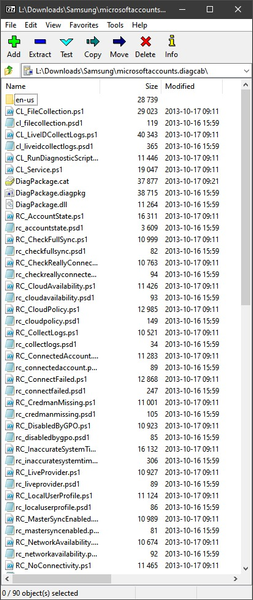
Hi! I downloaded today (2020-07-14) the tool ( https://social.technet.microsoft.com/wiki/contents/articles/13976.how-to-troubleshoot-microsoft-account-issues.aspx ) and opened it with 7-zip. The files there are from Oct. 2013. It means that the tool might not know about changes to account authentication. Therefore, it may report wrong conclusions/detections. I may be wrong but it seems to me that the tool needs some updating.5.6KViews1like5CommentsTurn on Mandatory ASLR in Windows Security
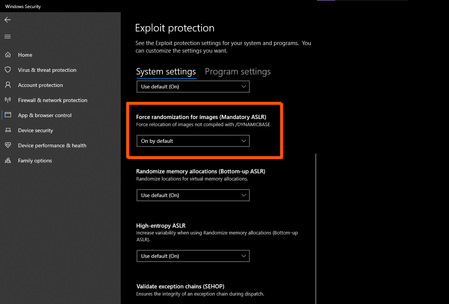
I've been using it for quite a while now, it caused no problems or errors with any legitimate programs, games, anti cheat systems etc other than with some "custom" made portable programs. it's Off by default, when you turn it on, you will have to restart your device. Address space layout randomization Address space layout randomization (ASLR) is a computer security technique involved in preventing exploitation of memory corruption vulnerabilities. In order to prevent an attacker from reliably jumping to, for example, a particular exploited function in memory, ASLR randomly arranges the address space positions of key data areas of a process, including the base of the executable and the positions of the stack, heap and libraries. The Linux PaX project first coined the term "ASLR", and published the first design and implementation of ASLR in July 2001 as a patch for the Linux kernel. It is seen as a complete implementation, providing also a patch for kernel stack randomization since October 2002.[1] The first mainstream operating system to support ASLR by default was the OpenBSD version 3.4 in 2003,[2][3] followed by Linux in 2005. https://en.wikipedia.org/wiki/Address_space_layout_randomization https://blogs.technet.microsoft.com/srd/2017/11/21/clarifying-the-behavior-of-mandatory-aslr/ Other options that are tuned off by default and you should enable to make your Windows device more secure With the increasing number of threats in cyber security and new ransomwares, If you are only relying on Windows 10's built in security and not using any 3rd party AV such as Kaspersky, you must enable these features to keep yourself secure. Hope everyone stay safe!118KViews4likes4Comments