windows security
15 Topics
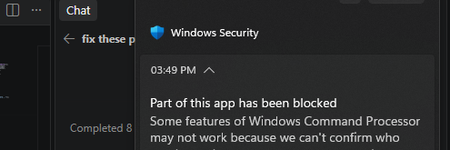
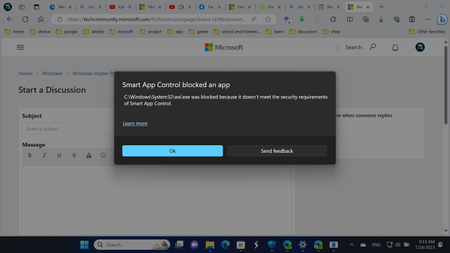
windows security smart control is blocking my cpp and exe files and how to fix these?
I own this Windows PC and Smart App Control is on. It blocks my locally built C++ app, Rose. Code Integrity events 3077 and 3033 show that firoseeyyy.exe and firoseeyyy-console.exe were blocked by code-integrity policy. I want to keep Smart App Control enabled. What signing or distribution options would let Windows trust my app, and would signing with a trusted code-signing certificate satisfy this policy? Please confirm whether Smart App Control can be turned back on after being disabled on my Windows version.110Views0likes1Comment
Hacked account / lack of live agents
I’m extremely frustrated with the process of trying to recover my Microsoft account. My account was compromised, and the person who got into it changed the email address associated with the account. Because of that, my original email is no longer recognized, and I cannot sign in or use the normal password recovery process. I have tried the recovery form, the Sign-In Helper, Microsoft support pages, chat support, phone support, and multiple other suggested recovery routes. Every single option seems to send me back to another automated system, another bot, or another page that eventually circles me back to the same place I already started. I have also run into technical errors when trying to start support chat, including the system trying to use my phone number as a UPN and failing because it expects an email-format username. At this point, I feel like I am being blocked from even reaching a real person who can properly review what happened. This is becoming a serious issue for me because I am a college student and I rely on my personal Microsoft account for access to services, files, applications, logins, and other resources I need to complete my schoolwork. Not having access is actively interfering with my ability to work efficiently and keep up with my responsibilities. I understand that Microsoft has security procedures in place to protect accounts, and I am fully willing to verify ownership. I can provide previous account information, old passwords I remember, devices I have used, purchase information, and other identifying account details. What I need is an actual support representative who can review the situation instead of being continuously redirected through automated recovery tools that are not resolving the problem. I am not asking for security to be bypassed. I am asking for a legitimate way to speak with someone who can help me recover an account that was taken over and had its sign-in information changed. If anyone from Microsoft Support sees this, or if anyone has successfully recovered an account after the primary email/alias was changed by an attacker, I would greatly appreciate guidance on how to reach the correct department or escalation team.116Views0likes0CommentsDriver digital signature authentication issues
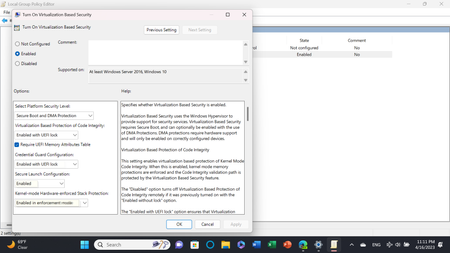
I am currently developing a desktop application for my company with a kernel driver (which is just a single .sys file). Since drivers must have a Microsoft digital signature to run starting with Windows 10, I have some questions about digital signature authentication. On this webpage (https://learn.microsoft.com/zh-cn/windows-hardware/drivers/dashboard/driver-signing-offerings#hardware-lab-kit-tested-and-dashboard-signed-drivers), I saw a solution for driver signing. The first method requires testing with HLK and submission to Windows Hardware Quality Labs for certification. The second method, according to its description, only requires submitting the driver for signature verification, without HLK testing. What are the differences between these two solutions? Which solution should I choose?225Views0likes2CommentsWindows update made dell laptop into a brick
Last security update on Jan 13th broke my laptop. Every program keeps freezing and doesn't do anything. Even when I open task manager it may run for a minute but soon it will freeze, and can't even end task. Only thing that is working is my browser. Yesterday I managed to reinstall windows using a USB and it was working again. While i was away, it forced an update and once again the same issues arise. laptop is too old to install 11, and going to try and reinstall windows again. There a way I can turn off the windows 10 update before this happens again? there is a patch, but i cannot install it. When it automated update, it bricks again and i can't install the most recent patch. it's in a never ending loop of hoping it doesn't auto update when i leave the computer on, or reinstall the OS with a usb. Dell inspiron 15 7559276Views0likes0CommentsControl Flow Guard caused tasks to suspend on launch
I've been tracking down the cause of a really troubling problem that started 5-6 x64 canary releases ago: running some executables would lead to a delay of 20-30 seconds before the application would actually launch. Discovered they were starting but immediately going into a suspended state (viewable in Task Manager) for up to 30 seconds, then they would appear on the screen and function normally. An example is Notepad++. I could repro the issue on demand by launching the app and then terminating it and then executing again a few times in rapid succession. Disabling Control Flow Guard (CFG) in Windows Security, App & Browser, Exploit Protection seems to resolve the issue. Reported in feedback, where there were about two other reports of similar behavior. Anybody else seeing issues with CFG ?309Views1like1Comment
Windows 11 Dynamic Lock Unstable
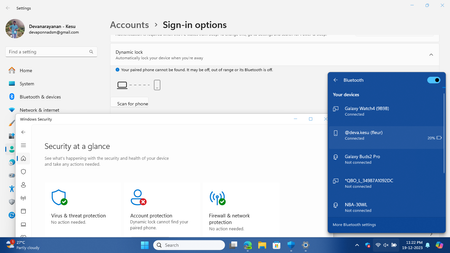
Dynamic Lock in Windows 11 is unstable. Even when phone is connected to PC via Bluetooth, Dynamic Lock says it can't detect your phone. This screenshot shows: my phone is connected but dynamic lock shows not detected. Sometimes it works if I press the Scan for Phone option manually. But its not intended to work like that.1KViews0likes2Comments
Windows Security Real Time Protection can't be enabled
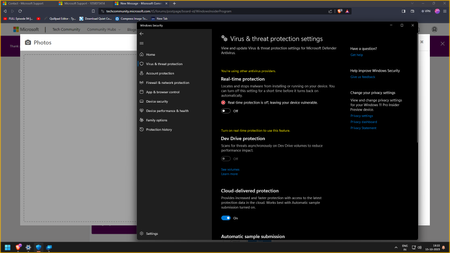
I am currently running Windows 11 Pro Insider Preview 23H2. I tried enabling real time protection in registry by settling real time protection key to 0, I tried to set not configured for real time protection in Local Policy Group, I have alo tried enabling it using Command prompt. However, none of the steps worked. Real time protection is still off and cannot be enabled. It just keeps on toggling off even when manually toggling it to on. I do hope that next Windows Updte would have a fix to this issue.852Views0likes1Comment