Forum Discussion

Unable to send notification to teams installed application users
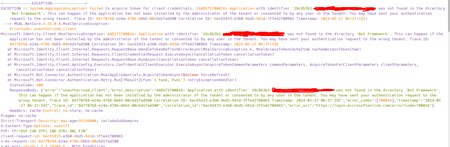

Prasad_Das-MSFT Hey thanks for the quick reply, I've the necessary permissions, but the problem is the exception is saying, that it is not able to find the BOT in the BOT framework, even though I've the same bot registered there and used the same ID (Application ID) i.e.,28c8b3b1-xxxxx-xxxxx-xxxxx.
As well as able to find it at "https://dev.botframework.com/bots/channels?id=28c8b3b1-xxxx-xxxx-xxx-xxxxxxxx"

 Microsoft
sarkarprashant - While creating app could you please choose the below option and enter the redirect URI for the app in the following format:
https://token.botframework.com/.auth/web/redirect
- sarkarprashantMay 29, 2024Copper Contributor
Prasad_Das-MSFT I've not registered any application like this, instead I've uploaded the app.dev zip package to "https://dev.teams.microsoft.com/apps" and added a bot to "https://dev.teams.microsoft.com/bots" which also showed my bot in bot framework i.e., "https://dev.botframework.com/bots/channels?id=28c8b3b1-xxxxxxxx". And on the bot framework I'm getting this error as well
- Prasad_Das-MSFTJun 05, 2024
sarkarprashant - Could you please check this thread and let us know if it helps you in any way?
azure ad b2c - AADSTS700016: Application with identifier 'some_id' was not found in the directory 'some_another_id' - Stack Overflow- sarkarprashantJun 05, 2024Copper Contributor
Prasad_Das-MSFT , hi and thanks for the response. My query is resolved automatically as I think that Microsoft was taking some time to complete the process of app upload.
But I'm getting error when trying to get the user details. Do you have any idea what permissions do I need to give to the bot using Admin privileges so that I don't get response of forbidden.