Forum Discussion

Unable to send notification to teams installed application users

 Microsoft
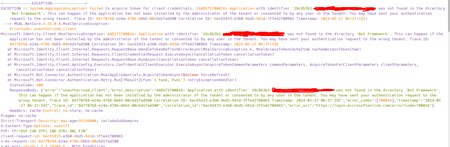
This can happen if you might have misconfigured the identifier value for the application or sent your authentication request to the wrong tenant.
1. Verify Application Identifier:
- Ensure that the correct
appIdorclient idis being used in the manifest.json file. ThebotIdshould match theappIdof the bot registration in Azure. - Check the
appIdin the Azure portal under the bot registration to confirm it matches the one in the manifest.json file.
2. Check Application Installation:
- Make sure that the application has been installed by the administrator of the tenant or consented to by any user in the tenant.
- Verify that the app has been uploaded to the organization's App Catalog and is available for installation by users in the organization.
3. Add Required Permissions:
- Confirm if the required Microsoft Graph Application-level permissions 'TeamsAppInstallation.ReadWriteForUser.All' have been added to the Azure AD app registration associated with your bot.
4. Update App Settings:
- Ensure that the
appsettings.jsonfile contains the correct ids and secret details related to the bot registration in Azure.
Similar issue here: Message: AADSTS700016: Application with identifier not found in the directory (domain name). error logging into outlook calendar from web app - Microsoft Q&A
You can also refer:
Fix - AADSTS700016: Application not found or consented to by any user. (morgantechspace.com)
However, if you have any business critical issue which need immediate attention, please raise a support request here:
https://docs.microsoft.com/en-us/microsoft-365/admin/get-help-support?view=o365-worldwide&tabs=online
Thanks,
Prasad Das
------------------------------------------------------------------------------------------
If the response is helpful, please click "**Mark as Best Response**" and like it. You can share your feedback via Microsoft Teams Developer Feedback link. Click here to escalate.

Prasad_Das-MSFT Hey thanks for the quick reply, I've the necessary permissions, but the problem is the exception is saying, that it is not able to find the BOT in the BOT framework, even though I've the same bot registered there and used the same ID (Application ID) i.e.,28c8b3b1-xxxxx-xxxxx-xxxxx.
As well as able to find it at "https://dev.botframework.com/bots/channels?id=28c8b3b1-xxxx-xxxx-xxx-xxxxxxxx"
- Prasad_Das-MSFTMay 29, 2024
sarkarprashant - While creating app could you please choose the below option and enter the redirect URI for the app in the following format:
https://token.botframework.com/.auth/web/redirect
- sarkarprashantMay 29, 2024Copper Contributor
Prasad_Das-MSFT I've not registered any application like this, instead I've uploaded the app.dev zip package to "https://dev.teams.microsoft.com/apps" and added a bot to "https://dev.teams.microsoft.com/bots" which also showed my bot in bot framework i.e., "https://dev.botframework.com/bots/channels?id=28c8b3b1-xxxxxxxx". And on the bot framework I'm getting this error as well
- Prasad_Das-MSFTJun 05, 2024
sarkarprashant - Could you please check this thread and let us know if it helps you in any way?
azure ad b2c - AADSTS700016: Application with identifier 'some_id' was not found in the directory 'some_another_id' - Stack Overflow