Forum Discussion

pksukeshpk
Jun 05, 2024Copper Contributor
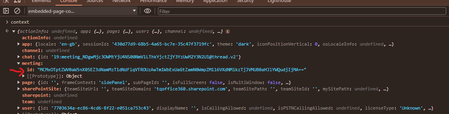
Getting “Meeting Id is corrupted” error while trying to fetch meeting details from Graph API
Below is the screenshot of the teams context object, When we try to get the meeting details from the Graph API with the meeting id obtained from the teams context object (Refer the above sc...

Prasad_Das-MSFT Microsoft
Jun 13, 2024Microsoftpksukeshpk - this API call will provide you the joinWebUrl in the response. You would get the {chat-id} for this from a call into Teams Client SDK.
Get chat - Microsoft Graph v1.0 | Microsoft Learn

pksukeshpk
Jun 13, 2024Copper Contributor
Okay. That I know. But in our case, we are not using the mentioned create online meeting API for creating the meeting. We are creating the meeting directly from the calendar, and then the organizer and attendee are joining by clicking the link from the Outlook calendar.
We are creating an app that can be added to any scheduled meeting while the meeting is on. We aren't creating any meeting