Forum Discussion

Advice needed: Need to redirect user to install custom app when clicking deeplink
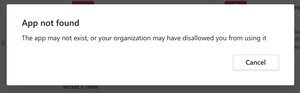

s6turner - Using manifest file mean are you trying to install the app using the manifest using app studio? if yes are you using the deeplink in the manifest? You will receive the "App not found" error while using the deeplink, it mean that the app does not present the user tenant on the app store. Could you please check whether the app in installed in user tenant? Could you please conform?
- s6turnerMay 07, 2021Copper ContributorHi Nikitha.
I have tested on our own Teams tenant and the following happens:
Before the test: block the published and publicly available AppSource app from users in my organisation, including myself.
1. Install manifest file on Teams Admin Center. App is now available to me as a custom third party app in AppSource.
2. Install and open app
3. Generate some content inside the app
4. Generate a deeplink to that content (sergey provided you an example of the link generated)
5. Uninstall the app (it is still available for me to install as a custom app in my AppSource)
6. Click the deeplink to the content inside the app
7. I see a popup window that says "App not found" (screenshot in original post)
8. Install the app again
9. Click the deeplink
10. Deeplink takes me to the correct content inside the app
Further testing, scenario 2:
Allow published app in AppSource
1. Install manifest file on Teams Admin Center. Now I see two versions of the app: 1 is a custom third party app in AppSource and a second version of the app is available as a published app.
2. Install and open custom third party app
3. Generate some content inside the app
4. Generate a deeplink to that content (sergey provided you an example of the link generated)
5. Uninstall the custom third party app (it is still available for me to install as a custom app in my AppSource)
6. Click the deeplink to the content inside the app
7. It redirects me to the install page of the published AppSource app
8. Block the published AppSource app for users in my organisation
9. Click the deeplink to the content inside the app
10. I see a popup window that says "App not found" (screenshot in original post)
What I want is:
GIVEN the Teams admin has installed the custom third party app in the Teams Admin Centre
AND made it available for all their Teams users
AND user A does not have the app already installed
WHEN user A clicks the deeplink
THEN they are redirected to the custom third party app install page in AppSource- s6turnerMay 07, 2021Copper Contributor
I have a separate question that could potentially solve this issue.
The reason we are using custom installations is to allow customers to customise the app name and logo.
I saw in the recent Teams release announcements that it is now possible to allow customers to customise the app name, icon etc.:
https://techcommunity.microsoft.com/t5/microsoft-teams-blog/what-s-new-in-microsoft-teams-april-2021/ba-p/2305291
I cannot find any documentation on which setting we need to change in order to make this customisation available to the customer. Is this something you can help and advise on? Sridevi-MSFTMay 11, 2021Former Employee
s6turner - Could you please refer this documentation for app customization in teams.