Forum Discussion

MS Teams Connector pop-up not loading and more
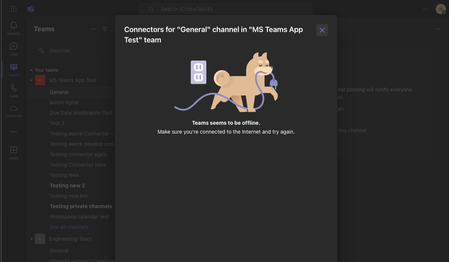

Prasad_Das-MSFT Hi, thanks for the quick reply! Which of the 3 issues are you referring to when you say that the "O365 Connectors Substrate team is aware of this issue and there is an ICM raised to fix this"?
My 3rd issue with configuring my connector is unrelated to the incoming webhook connectors. For this I am trying to configure the "awork" connector which we published at the MS Teams Connector Store:
Once I hit the configure button, I get the error message that something went wrong with the request id:
I get the following errors in my console, maybe this helps:
2 weeks ago this still worked, back then "only" saving the connector config failed.
Is there any more info I can provide from my side to solve this issue?

 Microsoft
ian_dev98, the ICM was raised for the issue that involves Teams Management not functioning correctly when creating Connectors. Users are experiencing errors such as 500 and 403 when attempting to create incoming webhooks and RSS connectors etc. The problem persists across both Teams desktop and web clients, with some users encountering a white screen upon completion of the creation flow. Users are unable to create or configure Connectors in Teams, encountering errors and white screens.
According to latest update
- 1P Category - In addition to Incoming Webhook and RSS, Jira Cloud, Jenkins, GitHub Enterprise, Bitbucket Server, New Relic, StatusPageIO, Pingdom would work with the latest fix. No other connector in this category works.
Note: There is known issue when creating an Incoming Webhook, which results in a white/empty screen, happens when clicking "Done" button at the end of the creation flow, to mitigate this issue, pressing Home at the top of the page to go back, would help, technically webhook would get created, and one can use it. - 3P Category - All connectors in this category works.
If your connector doesn't fall under fixed category, please share connector details along with tenant id, so that we can inform engineering team about update.
 pyankulovSep 03, 2024Tin ContributorHi,
You've stated that the web version should be fixed, but we are still not able to configure RSS connectors and web hooks no matter what client, OS, browser and etc.
Is there any public resource to follow the progress on this issue ?- Prasad_Das-MSFTSep 03, 2024
pyankulov , could you please share your tenant-id, so that we can inform engineering team? And apologies, there isn't any public resource available to track the progress.
 AdamWyldeOct 08, 2024Copper Contributor
Prasad_Das-MSFT hi we have the same issue - been unable to manage our Azure DevOps connector for months. Similar errors to ian_dev98 - lots of console errors, content security policy violations and general js errors.
Tried in Teams, Edge, and Chrome
- ian_dev98Sep 03, 2024Copper Contributor
Prasad_Das-MSFT Ty for the update!
We are a 3rd party app and seems like the issue is not fixed for our connector. The details are:
app id: 428a95dd-b9be-41c6-847a-0aeea6d706d6
app name: awork
connector id: 01ea66d6-db2b-4ef5-8579-d537c7920d84
connector config url: https://app.awork.com/api/v1/accounts/msteams/connector/config.html
I tested it in our normal tenant with id: 03df4317-6ae9-47cf-87d8-5b5a1469763e
as well as in a E5 developer tenant with id: 16a89b03-16aa-4dab-b547-81b9f183771e
(the E5 tenant can easily be used for testing)
- Prasad_Das-MSFTSep 03, 2024
ian_dev98 , thanks, we have shared this information with engineering team. Once we get any further update, we will inform you in this thread.
- ian_dev98Oct 10, 2024Copper ContributorI now managed to get the connector setup working by upgrading to the latest javascript teams-sdk as I was using a 1.x version instead of the current 2.28.0. With that the connector finally is able to saved on Teams desktop app for MacOS.Now I am running into another problem. I am getting the webhook url for the connector from the config.However, when I try to POST a message to the channel, I get the following response from Microsoft (see curl attached files):Unknown Connector provider ConnectToO365InlineI checked the console and there is a request to Update the ConnectToO365Inline connector (see curl attached files). When I run the curl to send the message again with the providerId instead of theConnectToO365Inline in the webhook url, I get the response:Connector configuration not foundCould you help me here as well? Is there any info I can provide to solve this? I added the 2 curls as a zip to this reply. Hope this helps.