Forum Discussion

Microsoft Teams Adpative card on clicking button how to open browser window as popup
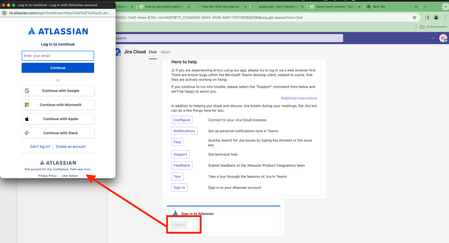

druuby -
In general, Adaptive Cards in Teams do not directly support opening a browser window as a popup. They can, however, trigger a Task Module which can then open a webpage in a popup-like experience within Teams.
Here's a sample code snippet that shows how to open a Task Module from an Adaptive Card:
{
    "type": "Action.Submit",
    "title": "Open Popup",
    "data": {
        "msteams": {
            "type": "task/fetch"
        }
    }
}
When this button is clicked, your app will receive an Invoke activity with name task/fetch. Your app should respond to this Invoke activity with a Task Module response that includes the URL of the webpage to open:
{
    "task": {
        "type": "continue",
        "value": {
            "title": "My Popup",
            "url": "https://www.example.com",
            "height": "medium",
            "width": "medium"
        }
    }
}
This will open the webpage in a Task Module, which is a popup-like experience within Teams. However, it will not open a new browser window or tab.
 druubyNov 02, 2023Copper Contributor
Meghana-MSFT
Thank you for replying. I am using the solution provided by you for a different use case.
I am looking to get some info on how the Teams Jira cloud app opens the browser window as a popup when clicking the sign-in button under the adaptive card.- Meghana-MSFTNov 03, 2023Former Employee
druuby -
To open a browser window as a popup when clicking the sign-in button under the Adaptive Card, you can use the TeamsJS library's
authentication.authenticate()function. This function is designed to open a popup window and start the authentication flow.Here is a sample code snippet using TeamsJS v2:
import { authentication } from "@microsoft/teams-js";
authentication.authenticate({
url: window.location.origin + "/tab/simple-start-v2",
width: 600,
height: 535})
.then((result) => {
console.log("Login succeeded: " + result);
let data = localStorage.getItem(result);
localStorage.removeItem(result);
let tokenResult = JSON.parse(data);
showIdTokenAndClaims(tokenResult.idToken);
getUserProfile(tokenResult.accessToken);
})
.catch((reason) => {
console.log("Login failed: " + reason);
handleAuthError(reason);
});
And here is a sample code snippet using TeamsJS v1:
microsoftTeams.authentication.authenticate({
url: window.location.origin + "/tab-auth/simple-start",
width: 600,
height: 535,
successCallback: function (result) {
getUserProfile(result.accessToken);
},
failureCallback: function (reason) {
handleAuthError(reason);
}
});
In both examples, the
urlparameter is the start page of the authentication flow. Thewidthandheightparameters define the size of the popup window. ThesuccessCallbackfunction is called when the authentication process is successful, and thefailureCallbackfunction is called when the authentication process fails.Please note that the authentication flow must start on a page that's on your domain. This domain should also be listed in the
validDomainssection of the manifest. Failure to do so will result in an empty pop-up.For more information, you can refer to the Teams platform documentation on Authentication in Teams.