Forum Discussion

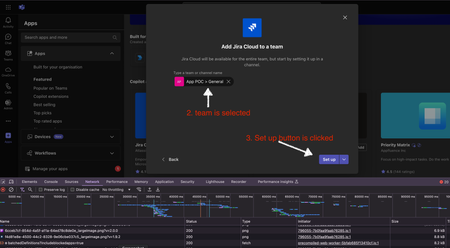
How to Open a Configuration Tab or Dialog When Clicking ‘Setup’ During App Installation on a Team

 Microsoft
DSRA2115 - Thanks for reporting your issue.
You can use the microsoftTeams.tasks.startTask method to open a dialog box directly when the user clicks the "Setup" button during installation. This method allows you to specify the URL of the external sign-up page and open it in a dialog box.
Example of how to use microsoftTeams.tasks.startTask:
microsoftTeams.tasks.startTask({
  title: "Sign Up",
  height: 500,
  width: 800,
  url: "URL"
});
Ref Doc: Invoke Dialogs from Tab, Bot, or Link - Teams | Microsoft Learn
 DSRA2115Oct 14, 2024Copper Contributor@Nividipa-MSFT Hello, Thanks for the reply. I have been using golang to handle the webhook events. I am using this sdk: https://github.com/infracloudio/msbotbuilder-go
I want to know how to use the startTask property in that case/- Nivedipa-MSFTOct 16, 2024DSRA2115 - The startTask function is from the Microsoft TeamsJS library. We are investigating for Golang language and for the sdk https://github.com/infracloudio/msbotbuilder-go.
We will update you soon.- DSRA2115Oct 17, 2024Copper Contributor
Sure, Nivedipa-MSFT
Basically, after discussion with my team, we only want the application to get configured as 'Set Up as bot' without a configurable tab (as we are not providing any useful feature in it, and only using it for permission and authentication flow) but we want to display a dialog box to request for permissions and handle third-party authentication.Currently, I’m trying to implement this from the backend using Golang by handling the “add InstallationUpdate” webhook event with an event listener. Ideally, I would like to open the dialog box directly from the backend, if that’s possible.
However, if it can only be done from the frontend, please let me know. The challenge is that we can't initialize Microsoft Teams JavaScript until only a configurable tab is opened (& our emdedded frontend link gets hit) and after the 'Set Up' button. Our goal is to open a dialog box, not a configurable tab, for requesting permissions and third-party authentication.